Authors name
Åsa Carlsson
CPS PrePress
Abstract
Transparent masking, the support to mask only selected objects (e.g. mask a railway, but keep the area objects) covered by an overlaying object (e.g. a text or symbol), has for a long time been a difficult challenge and an expensive task for high-quality digital cartography. The main difficulty has been the lack of support for object-based selective masking in the facto standard for graphic output files, the PostScript language. Digital cartography has therefore been restricted to use either expensive raster-based techniques or been forced to perform time-consuming interactive editing of objects to be masked.
CPS PrePress now presents a completely new approach to solve this problem by combining database-driven advanced symbolization techniques available inside CPS (Cartographics Production System), built on top of ARC/INFO, with the raster processing possibilities to produce a single raster output file, ready to be processed by a plotter, printer, film processors or other publication systems.
An integrated easy-to-use batch solution for transparent masking is finally available for database-driven cartography.
1. Introduction
T-Kartor combines database-driven advanced symbolization techniques available inside CPS with the raster processing possibilities, to produce a single raster output file, ready to be processed by a plotter, printer, film processor or other publication system.
To produce informative and aesthetically pleasing
maps, there is a strong need to support transparent object-based masking
in maps.
This is very difficult to accomplish without
either using time-consuming editing of the databases, or expensive raster
processing packages for interactive and batch post-processing in the raster
format, and results also in the need to have several very product specific
databases.
One example could be a green road box: The rivers and railways which goes through the road boxes should be visible, but not the background areas.
The CPS PrePress reads layer-specific parameters to produce a ready to print output image file in a format (TIFF, BMP, GIF, .) that can be read by any normal printing device.
2. Process
To correctly use CPS PrePress, correct color definitions must be applied to all included objects. This is especially important for text objects.
You can create textboxes in different types, for example rectangle, polygon and halo. It's possible to use outline and textstring underline.
For each map, properties must be defined to use
CPS PrePress. A certain amount of processes is set up for the different
themes included. Number of processes defines how many separate processes
must be created to achieve designed transparent masking results. They can
be set to opaque, highest pixel value or a mixture (with a percentage).
This defines how each process file will be overlaid
onto all underlying information. A theme is in normal cases only used in
one process, but can be assigned to several processes if needed.
You can also decide upon compression techniques and different resolutions in DPI.
3. Output
The output formats of CPS PrePress can be any raster format that supports the CMYK color model.
PrePress will create the defined number of EPS files by applying the defined theme symbology and one text file describing masking operations to apply to the created set of files. Thereafter the CPS PrePress module will merge the created color-separated EPS files into one output raster image file.
The plotting is a batch process, where one or many maps can be processed sequentially.
4. Hardware requirements
CPS PrePress requires minimum 64 Mb RAM, and one will also need much hard disk space, maybe up to > 1 GB if one will process large maps with high output resolution.
CPS PrePress supports a wide range of platforms such as Sun Solaris, Windows NT, Digital, HP, Silicon and IBM RS6000.
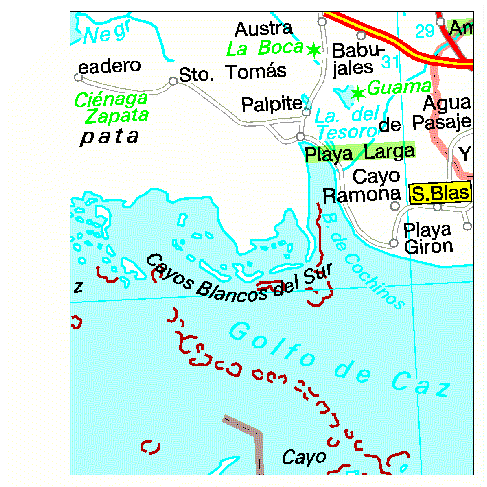
5. Demonstration example from Cuba
The included test BMP file demonstrates the following masking principles:
8 themes, using 3 different processes, were defined:
Process number 1 includes the theme Seapoly that draws ocean and lake polygons.
Process number 2 includes the theme admin-POLYGON that draws administrative buffers as polygons, the theme admin-ARC that draws administrative centerlines, the theme ground_ARC that draws coral reefs, the theme hydline-ARC that draws hydrographic lines, urban areas and grid lines, the theme road-ARC that draw roads and urban points and the theme texts-ANNO that draws texts with text masking defined and the yellow box.
Process number 3 includes zone-ARC that draws time zones and the transparent green box.
Åsa Carlsson
Key Account Manager
T-Kartor Sweden AB
Box 5097
S-291 05 Kristianstad
Sweden
tel. +46 44 206800
fax. +46 44 128256
e-mail. ac@t-kartor.se