Jonathan Groff
Tri-County Metropolitan Transportation District of Oregon
4012 SE 17th Avenue
Portland, Oregon 97202
BUILDING DATABASE GATEWAYS WITH
INTER-APPLICATION COMMUNICATION (IAC).
Abstract: With the Inter-Application Communication
functionality introduced in ArcInfo V7.0, it is
now possible to construct gateways to any database
management system that supports a CLI (Call-Level
Interface) or some form of API (Application Programming
Interface). Most DBMS provide such an environment.
Using the 'aiserver' stubs included as part of the
ArcInfo V7.0 distribution, the appropriate DBMS
function calls are inserted to correspond to the
IAC procedure numbers desired. The 'aiserver' is
linked with the DBMS function library and is run as
a background process. Using AML (Arc Macro Language),
it is possible to access this server from any
workstation on the network without cumbersome
middleware. The construction of the ArcInfo to IBM
DB2 (SQL/DS on VM) gateway developed at Tri-Met will
be discussed.
	INTRODUCTION:


		The IAC mechanism provided in V7.0 is a welcome step

	forward in providing open system connectivity to ArcInfo.

	This functionality is provided by utilizing RPC

	(Remote Procedure Call), a tried and true component of the

	UNIX and now MS Windows environment.  Most of the painful

	details of implementing an RPC application are shielded from

	the user by the IAC mechanism and the supplied server stubs.


		On the server side, the 'aiserver' is a series of C

	functions which can be dispatched by an AML IAC function call.

	By creating generic AML routines and some special AML connection

	modules, any number of database environments can be accessed from

	server processes running on diverse platforms.


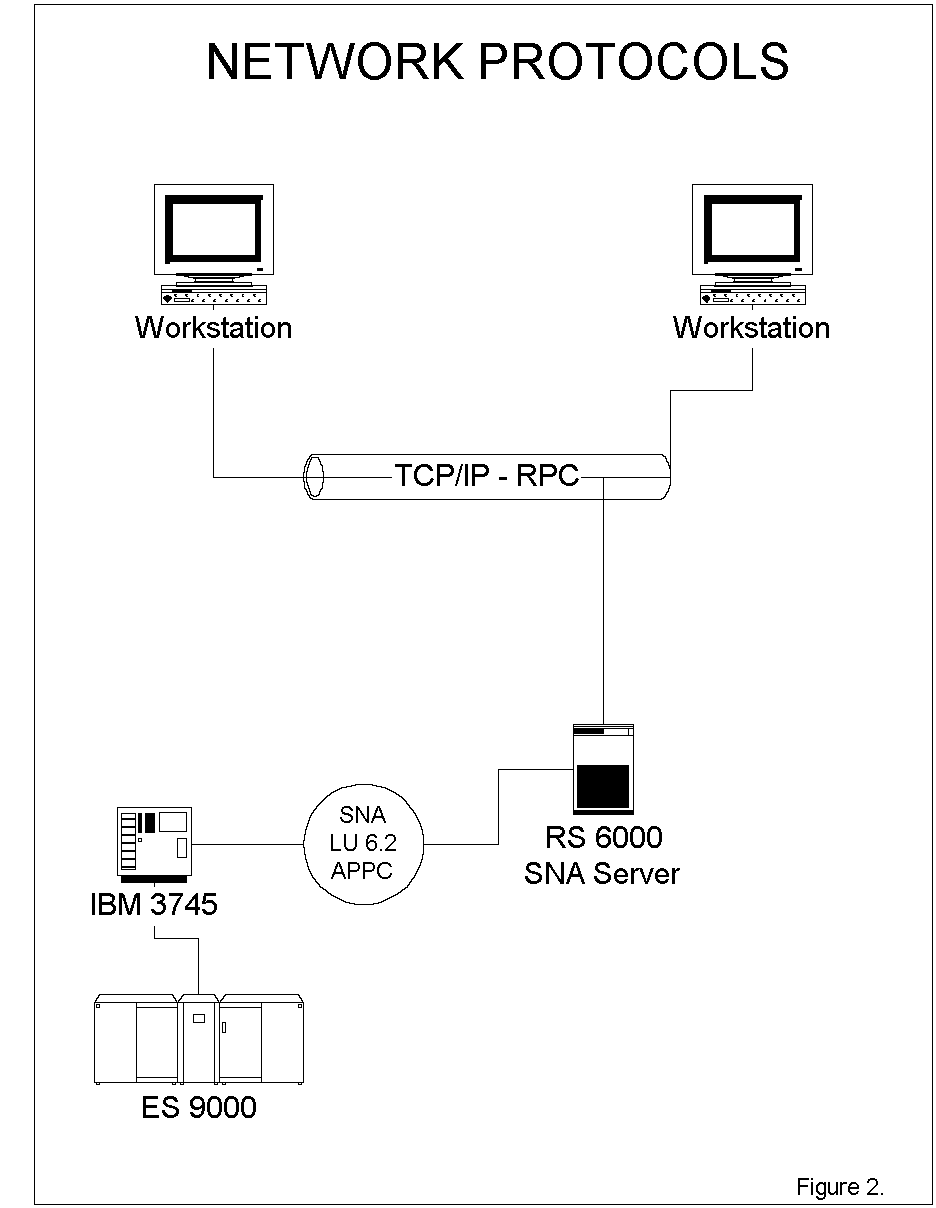
		At Tri-Met, this manifests itself in an ArcInfo to SQL/DS

	(DB2/VM) gateway.  At this writing the server is in production

	running on an IBM RS/6000 590.  IBM DDCS  (Distributed Database

	Connection Services) operating over a 16Mb/s token-ring SNA

	(System Network Architecture) channel to the ES/9000 Mainframe

	provides the connection to DB2/VM. Currently, three ArcInfo

	workstations are accessing the server from AIX, DEC OSF/1, and

	SOLARIS.  By connecting to the RPC over the network

	from these UNIX workstations, queries and data can be sent and

	received via the RS/6000 server, then over the SNA channel to the

	DB2/VM environment.  Figures 1, 2, and 3 illustrate the physical,

	network, and database connections.


	DESIGN GOALS:


		The primary objective of this project was to build a

	server that could be adapted to whatever DBMS the user would

	encounter.  In addition, no supplemental software (middleware)

	should be necessary;  the system should work with ArcInfo and

	the target DBMS 'out of the box', regardless of platform,

	from anywhere on the corporate LAN, WAN, and even the Internet.

	In addition, the system should support a moderate level of

	security.  Access to remote system passwords should be hidden

	from the user, and a means to securely establish and keep a

	connection should exist.  The server should also incur little

	overhead even under heavy loads.  Other criteria include the

	ability to monitor connections, disconnections and transactions,

	and easily bring the servers up and down.  Some degree of

	isolation should also exist wherein the peccadillos of one

	user do not adversely affect another.


	SUPPLIED ArcInfo STUBS:


		A brief description of the components supplied with

	ArcInfo and the manner in which they are utilized may serve

	to illuminate.  The primary elements are the 'aiserver' stubs.

	This C library is compiled and linked as an RPC application.

	A header file called 'prognum.h' contains the 8 digit

	hexadecimal number that is the RPC registration number of

	the module.  The registration number along with the server

	name is used by the AML function [iacconnect] to establish a

	connection with that RPC, on that server.  By changing this

	header and re-compiling the stubs, multiple servers can be

	constructed.  Appendix A contains a version of the aiserver

	stubs with pseudocode added for the IAC database gateway

	functions.


	DESCRIPTION OF IAC SERVER FUNCTIONS:


		Making a Connection:


		The initial step is to establish a connection to the IAC

	server using the [iacconnect] AML function.  The syntax of this

	function looks like this:


		&sv iachandle =  [iacconnect SERVER_NAME RPC_HEX_PROGNUM ~

						RPC_VERSION_NUMBER ~

						RETURN_STATUS]


		Conversely, the disconnect is as follows:


		&sv dum = [iacdisconnect %iachandle%]


		After establishing a connection to the server, a

	connection to the database is then attempted.  In order to gain

	access to the database it is necessary to call function 80 in the

	IAC Server (Functions begin at 80 in the hope that if there are

	aiserver functions already in use no conflicts will arise).

	In order to obtain a successful return from the database connect,

	it is necessary to specify a profile name as the function argument.

	This profile name is located in the file /usr/ddbprofile and

	contains the profile name, RPC PROGNUM, database name, user name

	on the remote system, and the remote system password.  The file

	should have read-write permissions for user only, and the owner

	should be root. This allows only root to view/modify it,

	providing a modicum of security as the user never sees the

	remote system login name or password.  By using the &encode

	&encrypt and &echo &off arc commands on the module where

	[iacconnect] is called,  the user can be prevented

	from seeing the profile fields, thereby enhancing security.


	 A line of the /usr/ddbprofile file looks like this:


		PROFILE:0x42000000,database_name,user_name,password


		Each RPC registration number is unique to a server module.

	Each profile name uniquely identifies a server module and denotes

	the database name, login user and password.  The same database and

	user name can be used by multiple profiles but the nature of the

	DB2 CLI's allocation and deallocation of global handles demand

	that connection to each server be by one user and one database.

	Of course, multiple connections to the same or different databases

	can be established through several profiles/servers.  There is a

	benefit in that each user is encapsulated within a process and

	therefore can be easily manipulated by standard system

	administration tools.


		Server Function Invocation:


		The server functions are called by the [iacrequest] AML

	function.  The ordinal number of the function in the 'aiserver'

	stubs is passed as one of the arguments. You may pass an argument

	to the numbered function.  The result of the call is placed in

	the variable on the left side of the statement. The format of

	the [iacrequest] function is:


		&sv res = [iacrequest %iachandle% IAC_FUNCTION_ORDINAL ~

						IAC_ARGUMENT ~

						RETURN_STATUS ~

						OPTIONAL_TIMEOUT_IN_SECONDS]


		So, using our connection handle from [iacconnect], we

	connect to the database as follows:


		&sv stmt_handle = [iacrequest %iachandle% 80 PROFILE rstat]


		Where the variable 'stmt_handle' is a statement

	handle returned from the IAC Server.  This ten character hex value

	serves the dual functions of providing authentication to the

	server and denoting the statement handle in use.  The handle is

	encoded at the beginning of each request to the Server.  Up to

	100 connections/statement handles can be allocated per server

	process.


		A highly recommended practice is to free a statement handle

	after use.  Invoke function 99 of the IAC Server as follows:


		&sv dum = [iacrequest %iachandle% 99 %stmt_handle% rstat]


		In the working model, an AML was built to facilitate

	connection and disconnection.  Let's look at iac_connect in its

	entirety:


	/*------------------

	/* IAC Server connection module

	/* &r iac_connect server .rsvc

	/* &r iac_connect handle .rsvc .handle

	/* &r iac_connect free .rsvc .handle

	/* &r iac_connect disconnect .rsvc .handle

	/* ..

	/* (C) J. Groff/Tri-Met 8/95

	/*-------------------

	&args .iop .ichandl .ishandl

	/* be quiet: for security

	&echo &off

	/* these vars define the server name, rpc registry, and

	/* profile name

	&sv server = bigbop

	&sv rpcreg = 42000000

	&sv profile = PROFILE

	/*

	&select %.iop%

	  &when server

	   &do

	      &sv %.ichandl% = [iacconnect %server% %rpcreg% 1 rstat]

	      &return

	   &end

	  &when handle

	   &do

	      &sv %.ishandl% = ~

			[iacrequest [value %.ichandl%] 80 %profile% rstat]

	      &if [extract 1 [quote [value %.ishandl%]]] = ERROR &then

		 &return &error Could Not Get Statement Handle...

	      &return

	   &end

	  &when free

	   &do

	      &sv dum = ~

			[iacrequest [value %.ichandl%] 99 ~

			[value %.ishandl%] rstat]

	      &dv %.ishandl%

	      &return

	   &end

	  &when disconnect

	   &do

	      &sv dum = [iacrequest [value %.ichandl%] 97~

				 [value %.ishandl%] rstat]

	      &sv dum = [iacdisconnect [value %.ichandl%]]

	      &dv %.ishandl% %.ichandl%

	      &return

	   &end

	  &otherwise

	      &return &error Unknown Operation.....

	&end


		Executing a Remote SQL Statement:


		Once the server connection and statement handle have been

	acquired,  the desire may arise to do something with them. A

	popular pursuit is the execution of a SQL statement on the

	remote database.  Luckily, the IAC server has a function to

	fulfill this desire and that function is number 90.


		 Depending on the DBMS and its CLI, the 'SQL direct execute'

	function may have different capabilities.  In the case of DB2,

	everything goes except a COMMIT or ROLLBACK, which require separate

	functions in the IAC server.


		The format of the SQL direct execute server function is as

		follows:


		&sv sqlstat = ~

			[iacrequest %iac_handle% 90~

			[quote %stmt_handle%[unquote %SQL%]] rstat]


		Observe the manner in which the statement handle is

	encoded with the statement.  Server function 90 decodes this

	statement and uses the handle for verification.  Once verified,

	the statement is assigned the handle and executed, and if the

	variable sqlstat contains ERROR, the remainder of the variable

	contains the error message.


		The code for the iac_exec AML is illustrated below:


	/*------------------

	/* iac_exec .servce_var .handle_var %stmt%

	/* Direct Execution of Statement on Server

	/* svc and hndl are passed variable names for service

	/* and handle

	/* stmt is SQL statement (not a variable..)

	/* (C) J. Groff/Tri-Met 8/95

	/*-------------------

	&args .isvc .ihndl .istmt

	&sv .sqlstat = [iacrequest [value %.isvc%] 90~

		[quote [value %.ihndl%][unquote %.istmt%]] rstat 1000]

	&if [extract 1 [quote %.sqlstat%]] = ERROR &then

	   &do

	     &return &error Error %.sqlstat% executing %.istmt%

	   &end

	&return


		Obtaining Data From the Selected Set:


		Upon successful completion of IAC function 90, we

	have a selected set, and in distributed database parlance a

	'Remote Unit Of Work'.  A default cursor is issued by the CLI

	for the selected set.  This cursor is advanced one row by our

	next IAC function; number 91:


		&sv res =  [iacrequest %iac_handle% 91 %stmt_handle% rstat]


		This function returns either SUCCESS if data was

	obtained, ERROR if an error occurred, or DONE when the

	end of the selected set is reached.  The AML to encapsulate

	this function is described below:


	/*------------------

	/* iac_fetch .service_var .handle_var .result_var

	/* fetch next row from result set

	/* args passed are variable for server, statement handle

	/* and variable to receive result.

	/* return SUCCESS if good, DONE when end of set is reached, or ERROR

	/* (C) J. Groff/Tri-Met 8/95

	/*-------------------

	&args .isvc .ihndl .ires

	&sv %.ires% =  [iacrequest [value %.isvc%] 91~

		 [quote [value %.ihndl%]] rstat]

	&return


		Once the data has been 'fetched', the columns within the

	row can be extracted by our next function.  Suprisingly, it's 92:


		&sv res = ~

			[iacrequest %iac_handle% 92 ~

			[quote %stmt_handle%%column%] rstat]


		Again, the statement handle is encoded with the column

	desired, and the actual data is returned in the variable 'res'.

	The AML module to make this less painful is illustrated thusly:


	/*------------------

	/* iac_getdata .service_var .handle_var %column% .result_var

	/* get data for named column of current fetch

	/* args passed are variable for server, statement handle

	/* column number to get (based on order in SELECT stmt)

	/* and variable to receive result.

	/* (C) J. Groff/Tri-Met 8/95

	/*-------------------

	&args .isvc .ihndl .icol .ires

	&sv %.ires% = [iacrequest [value %.isvc%] 92~

		[quote [value %.ihndl%]%.icol%] rstat]

	&if [quote [value %.ires%]] = ERROR &then

	   &return &error GetData Error Column %.icol%...

	&return


		Constructing a Real-Life Example:


		With a great sigh of relief we have finally have the

	functionality we need to connect to a remote database, acquire

	a statement handle, execute a SQL statement, fetch a row, and

	extract a column.  At this point we can write a useful AML.

	Since bus stops are a big part of life here at Tri-Met, there are

	many legacy systems that access and maintain the tables on the

	IBM ES/9000. Access to these tables from the GIS was a primary

	motivation for this project.


		The production component of the GIS supplies spatial data

	to these tables.  In the past, updating was done with a

	problematic upload/download/logging process.  These tables are

	now accessed directly via the IAC server.


		The structure of the first table is a 'Locations' table

	containing the absolute position of each Stop in the system.

	The 'Routes' table contains a list of the locations by route

	and direction.  The 'Locations' table is joined to the'Routes'

	table in a many-to-one relation.  The schema for these tables

	follows:


	Locations Table, Column Name, and Description

	컴컴컴컴컴컴컴컴컴컴컴컴컴컴컴컴컴컴컴컴컴컴컴컴컴컴�

	LOC_ID          The unique identification number of a

				Location

	LOCATION                The street that a Location is actually                                                          "located" on


	INTERSECTION    The cross-street or landmark where a

				Location is actually "located"


	Spatial elements added by the GIS (RASDA):


	X_COORD         The X-coordinate of the location based

				on the State Plane measurement in feet


	Y_COORD         The Y-coordinate of the location based

				on the State Plane measurement in feet


	LATITUDE        Decimal latitude of the location


	LONGITUDE       Decimal longitude of the location


	JURISDICTION    The city where a location is

				(or Null county if the location is not

				within any city limits)


	ZIP             The zip code of the locatiion


	Routes Table, Column Name, and Description

	컴컴컴컴컴컴컴컴컴컴컴컴컴컴컴컴컴컴컴컴컴컴컴컴컴컴�

	RTE             A code representing an individual bus route


	DIR             The direction of the Route "1" - Inbound,

				 "0" - Outbound


	STOP            A number that identifies the order the stops                                                    generally occur on the Route


	LOC_ID          The unique identification number of a

				Location


		Not surprisingly, the first program constructed was one

	to display the bus stops in a particular route and direction.

	The AML to draw the coordinates from the Route and Stop tables:

	/*------------------

	/* distributed location draw

	/* gets x,y's from remote DB based on

	/* route, direction, and effective date

	/* (C) J. Groff/Tri-Met 8/95

	/*-------------------

	&args .rout .dir

	/* make nice for drawing

	markersymbol 10

	units map

	/*

	/* define the remote DB names

	/*

	&sv .rds_stop_loc = db01.sad001_location

	&sv .rds_stop_rte = db01.sad003_rtestop

	/*

	/* set effective date

	/*

	&sv .eff_date = 09/01/1995

	/*

	/* connect to IAC server

	/*

	&r iac_connect server .rsvc

	/*

	/* connect to DB, obtain handle

	/*

	&r iac_connect handle .rsvc .hndl

	/*

	/* set up select statement

	/*

	&sv resel = ~

	select rte, dir, stop,~

		rte_stop_beg_date, rte_stop_end_date,~

		,a.loc_id, x_coord, y_coord, ~

		from %.rds_stop_rte% a,~

		%.rds_stop_loc% b~

		where a.loc_id = b.loc_id and ~

		[quote %.eff_date%] between ~

		rte_stop_beg_date and rte_stop_end_date and~

		rte = %.rout% and dir = %.dir%~

		order by rte, dir, stop, rte_stop_beg_date

	/*

	/* do the exec

	/*

	&r iac_exec .rsvc .hndl [quote %resel%]

	/*

	/*---------main fetch/getdata loop

	/* grab columns 7 and 8 from above select

	/*

	&r iac_fetch .rsvc .hndl .res_var

	/* Fetch the data

	&do &while %.res_var% = SUCCESS

	  &r iac_getdata .rsvc .hndl 7 .xcoor

	  &r iac_getdata .rsvc .hndl 8 .ycoor

	  marker %.xcoor% %.ycoor%

	  &r iac_fetch .rsvc .hndl .res_var

	&end

	/*

	/* free up and leave

	/*

	&r iac_connect disconnect .rsvc .hndl

	&return


	Ancillary Functions:


		Several other functions were added to the server to make

	programming life more fulfilling.  The number of columns in

	the selected set may be returned by function 82 as illustrated

	in the following AML:


	/*------------------

	/* iac_numresult .service_var .handle_var .result_var

	/* return number of result columns from select

	/* args passed are variable for server, statement handle

	/* and variable to receive result.

	/* (C) J. Groff/Tri-Met 8/95

	/*-------------------

	&args svc hndl res

	&sv %res% = [iacrequest [value %svc%] 82~

		 [quote [value %hndl%]] rstat]

	&if [quote [value %res%]] = ERROR &then

		&return &error NumResult Error...

	&return


		If the need arises to name the default cursor, as in

	the case of an 'UPDATE WHERE CURRENT', this can be

	accomplished by function 92 as shown:


	/*------------------

	/* iac_declare .service_var .handle_var %cursor%

	/* Declare cursor for current result set of .handle_var

	/* args passed are variable for server, statement handle

	/* name of cursor

	/* (C) J. Groff/Tri-Met 8/95

	/*-------------------

	&args svc hndl cursor

	&sv .sqlstat = [iacrequest [value %svc%] 92~

		[quote [value %hndl%]%cursor%] rstat]

	&if %.sqlstat% = ERROR &then

		&return &error Could Not Declare Cursor %cursor%...

	&return


		To list the databases available to the logged in user ID,

	function 81:


	/*------------------

	/* iac_dbinfo .service_var .handle_var .result_var

	/* fetch next row from DBInfo buffer, these are

	/* the databases available to current user ID

	/* although access to only the one defined by login profile

	/* is allowed, I guess this is like staring thru the bars...

	/* args passed are variable for server, statement handle

	/* and variable to receive result.

	/* return END when end of set is reached or ERROR or data

	/* (C) J. Groff/Tri-Met 8/95

	/*-------------------

	&args svc hndl res

	&sv %res% =  [iacrequest [value %svc%] 81~

		[quote [value %hndl%]] rstat]

	&if [quote [value %res%]] = ERROR &then

		&return &error DBInfo Error...

	&return


		To obtain the column name, size, length, and type of a

	specific column from the selected set.  Call function 83 with

	the desired column:


	/*------------------

	/* iac_colinfo .service_var .handle_var .column .result_var

	/* return column info on selected columns

	/* args passed are variable for server, statement handle

	/* column requested and variable to receive result.

	/* (C) J. Groff 8/95

	/*-------------------

	&args svc hndl col res

	&sv %res% =  [iacrequest [value %svc%] 83~

		[quote [value %hndl%]%col%] rstat]

	&if [quote [value %res%]] = ERROR &then

		&return &error ColumnInfo Error...

	&return


		That about wraps up our server functions.  After building

	these modules, the RASDA system was re-tooled to use distributed

	access and no local copies of tables need to exist.


	FUTURE DIRECTIONS:


		Apparently, ArcView V2.1 supports an 'RPC Client'

	function call that could be utilized to access this server from

	that application.  In addition to that, there has been a lot of

	ballyhou over you-know-whose ODBC standard.  The former would

	allow desktop GIS greater flexibility while the latter would

	require enhancing the server to deliver increased support for

	the standard, which really has nothing to do with GIS, but

	addresses the larger issue of agency connectivity. In that

	same vein, there are many Software Development Kits (SDK's)

	that support RPC development under various OS's and platforms.

	These tools could be utilized to produce platform-independent

	client modules that could be linked with other applications.

	Another avenue of research is connecting to these servers from

	WAN's/Internet.  As an example, the regional MPO has a need to

	access up-to-the-minute Route and Stop information and this server

	could provide that kind of access.


	APPENDIX A. IAC Server Pseudocode:

														/*********************************************************

	**

	** IAC Database Server - Inter-Application Communication

	** Server

	** Access is through RPC -> Call Level Interface -> DDCS ->

	** Database

	** Direct execution of an SQL statement.

	** Getdata is used to retrieve information from the

	** result set.

	**

	** Access is thru connect using a profile name.  A uuid

	** is issued for each 'connection'.  This corresponds to

	** separate statement handles.

	**

	** Because of the way the CLI works, only 1 connection

	** handle and environ

	** handle can be in use by an app.  This translates to 1

	** user ID / database connection per server, so when

	** connection via profile,the /usr/ddbprofile

	** entry for this server is checked for the profile. File

	** has structure:

	** profile:server_rpc_hex,database,user,passwd.

	**  At startup the profile for this server is loaded from

	** file. Up to 100 connections (max stmt handles) can be made

	** to this server

	** (C) J. Groff/Tri-Met 8/95

	**********************************************************/


	/*  FUNCTIONS PSEUDOCODED FOR BREVITY */


	/* Standard 'C' library header includes */


	#include "stdio.h"

	#include "string.h"

	#include "stdlib.h"

	#include "sys/types.h"

	#include "unistd.h"

	#include "time.h"


	/* include for Call Level Interface of your favorite DBMS */


	#include "sqlcli1.h"


	/* include the header that defines the RPC registry for this

	 module */


	#include "prognum.h"


	/* Maximum statement length - a condition of AML */

	#define MAX_STMT_LEN 1024


	/* here is where to define prototypes and structures */

	#define MAXHANDLE 100

	/* this is max num of stmnt handles per app */


	/************************************************************

	** clockout

	** convert time struc to formatted out string MM/DD/YY

	** DAY HH:MM:SS

	*************************************************************/

	char* clockout(stim* timstr)

	{

		convert_the_current_time

		return_pointer_to_string

	}

	/***********************************************************

	** verify_Slot

	** find the slot in uuid and verify it, return slot number

	** or -1 the uuid contains a slot number that corresponds

	** to a SQL statement handle, the uuid in the slot and the

	** uuid specified in inlin must match

	***********************************************************/

	int verify_Slot(char* inlin)

	{

		get_uuid_from_inlin

		verify_uuid_in_range

		find_slot_of_uuid

		verify_uuid_against_uuid_in_slot

		return_slot_or_error

	}

	/**********************************************************

	** initialize

	**  - Find available server slot

	** if not connected...

	**  - allocate environment handle

	**  - allocate connection handle

	**  - connect to server

	**********************************************************/

	int initialize(int* Sslot)

	{

		if_not_connected

			open_/usr/ddbprofile_read_only

			search_file_for_profile_name

			compare_PROGNUMs

			if_not_found

				error_exit

			else

				set_up_remote_userid_password_profile_name

		endif


		log_time

		look_for_server_slot_for_connection_handle_and_

			statement_handle

		if not_found

			error_NO_SERVER_SLOTS_exit

			(this means more than 100 statement

			 handles allocated...)

		setup_server_slot

		print_connect_message:

		print ** LOGIN ** Server PID slot X

		print Attempted connect for PROGNUM @ Current_Time


		Allocate_environment_handle_if_not_already

		Allocate_connection_handle_if_not_already


		Issue_SQL_Connect

		if error

			error_message_then_exit


		Allocate_statement_handle


		if error

			freak_out_and_exit


		Log_time

		print_connect_message:

		print PROGNUM connected @ Current_time


		return(SQL_SUCCESS);


	}/* end initialize */


	/**********************************************************

	** terminate

	**  - 'disconnect'

	**  we don't actually disconnect from the DB, just free the

	**  statement handle.

	**********************************************************/

	void terminate(int* Sslot)

	{

		Verify_Slot

		Free_statement_handle

		Free_slot

		return

	}/* end terminate */


	/**********************************************************

	** terminate_all

	**  - 'disconnect'

	**  we don't actually disconnect from the DB, just free all

	**  the statement handles. This occurs after COMMIT

	**  or ROLLBACK...

	**  when they all go bye-bye invalid

	***********************************************************/

	void terminate_all(void)

	{

		For_all_server_slots

			if connected

				Free_statement_handle

		End_for

		return

	}/* end terminate_all */


	/**********************************************************

	** disconnect

	**  - 'disconnect'

	**  hard disconnect from the DB, not just free the

	**  statement handle.

	**********************************************************/

	void disconnect(int* Sslot)

	{

		Verify_slot

		Disconnect_from_database

		Free_connection_handle

		Free_environment_handle

		Call_terminate_all();

		Log_disconnect

		print PROGNUM disconnected @ Current_time

		return

	}/* end disconnect */


	/*-----------------------------------------------------

	*   Purpose:

	*   This file contains the stubs for server functions.

	*   These functions are invoked from aiserver_svc_proc.c.

	*   These functions simply transfer

	*   control to a user written function, where they are

	*   defined, and return

	*   a "Procedure not defined" string otherwise.

	*-----------------------------------------------------

	*  Arguments:

	*   {{instr,outstr}}

	*   {instr    Input    === (char *) Input string argument,

	*                                                if any}

	*   {outstr   Output   === (char *) Results of the

	*                                                operation}

	*-----------------------------------------------------

	*    Ravi Narasimhan   [4/27/94]          Original coding.

	*-----------------------------------------------------

	*/

	void Function1 (instr,outstr)

	char *instr, *outstr;

	{

	/*      Exponent (instr,outstr);*/

	}

	void Function2 (instr,outstr)

	char *instr, *outstr;

	{

	/*      LogE (instr,outstr);*/

	}

	void Function3 (instr,outstr)

	char *instr, *outstr;

	{

	/*      Log10 (instr,outstr);*/

	}


	..... Function4 - Function79 As Above .....


	/*----------------------------------------

	;

	; Start of CLI functions interspersed 80-99

	; 80 - Connect: pass profile name,Reads profile file,connect

	; to db,user,pass

	; 81 - Datasource: semi-private since db connections is based

	;               1/profile

	; 82 - Number Results: Columns involved in select

	; 83 - Column Description: various facts about specific column

	; 85 - Declare Cursor: to passed uuid/stmnt handle

	; 90 - Exec Direct:

	; 91 - Fetch Next Record: returns SUCCESS, ERROR, DONE

	; 92 - Retrieve data from passed column: returns data or ERROR

	; 93 - Retrieve data, strip single quote

	; 97 - Hard Disconnect

	; 98 - Rollback, terminate connect

	; 99 - Commit, terminate connect

	;-----------------------------------------*/

	void Function80 (instr,outstr)

	char *instr, *outstr;

	{

		Call_initialize(slot);

		If Cant_initialize_or_profile_name_not_found

			Call_terminate(slot);

			return_ERROR_in_outstr

		Endif

		Set_slot_connected

		return_SUCCESS_in_outstr

	}

	/*-------------------------------------

	** 81   - list available servers

	**-------------------------------------*/

	void Function81 (instr,outstr)

	char *instr, *outstr;

	{

		For_each_available_data_source

			build_data_base_and_description_string

			if_not_end

				return_data_base_and_description_

				string_in_outstr

		End_for

		return_END

	}

	/*-------------------------------------

	** 82   - return number result columns from select

	**-------------------------------------*/

	void Function82 (instr,outstr)

	char *instr, *outstr;

	{

		verify_Slot(instr);

		convert_number_result_columns_to_ascii

		return_number_in_outstr

	}

	/*-------------------------------------

	** 83   - return column metrics

	**-------------------------------------*/

	void Function83 (instr,outstr)

	char *instr, *outstr;

	{

		verify_Slot(instr);

		Call_CLI_routine_to_get_Column_name_size_length_type

		switch_on_column_type

		{

			On_case_of_switch,_translate_to_column_description

		}

		return_name_size_length_type_description_in_outstr

	}

	void Function84 (instr,outstr)

	char *instr, *outstr;

	{

		strcpy (outstr,"Procedure 84 not implemented");

	}

	/*----------------------------------------

	** 85 - Declare cursor

	** pass uuid in instr, this will select stmnt

	** handle to assign named cursor

	**----------------------------------------*/

	void Function85 (instr,outstr)

	char *instr, *outstr;

	{

		verify_Slot(instr);

		Call_CLI_to_set_cursor_name_to_passed_name

		return_SUCCESS_in_outstr

	}

	void Function86 (instr,outstr)

	char *instr, *outstr;

	{

		strcpy (outstr,"Procedure 86 not implemented");

	}

	void Function87 (instr,outstr)

	char *instr, *outstr;

	{

		strcpy (outstr,"Procedure 87 not implemented");

	}

	void Function88 (instr,outstr)

	char *instr, *outstr;

	{

		strcpy (outstr,"Procedure 88 not implemented");

	}

	void Function89 (instr,outstr)

	char *instr, *outstr;

	{

		strcpy (outstr,"Procedure 89 not implemented");

	}

	/*--------------------------------

	** 90 - Exec SQL stmt

	** returns SUCCESS or ERROR

	**-------------------------------*/

	void Function90 (instr,outstr)

	char *instr, *outstr;

	{

		verify_Slot(instr);

		Call_CLI_Execute_Direct_SQL_statement

		if_error

			return_ERROR_in_outstr

		else

			return_SUCCESS_in_outstr

	}

	/*---------------------

	** 91 - Fetch next record in selected set

	** return SUCCESS, ERROR, or DONE

	**---------------------*/

	void Function91 (instr,outstr)

	char *instr, *outstr;

	{

		verify_Slot(instr);

		Call_CLI_to_fetch_next_record

		if_error

			if_No_Data_Found

				return DONE_in_outstr

			else

				return_ERROR_in_outstr

		else

			return_SUCCESS_in_outstr

	}

	/*---------------------

	** 92 - GetData - pass column to fetch in instr

	** return the value in outstr

	**---------------------*/

	void Function92 (instr,outstr)

	char *instr, *outstr;

	{

		verify_Slot(instr);

		Call_CLI_to_get_data_from_column_encoded_in_instr

		if_error

			return_ERROR_in_outstr

		else

			return_data_from_passed_column_in_outstr

	}

	/*-----------------------------

	** 93 - GetData sans single quote

	**-----------------------------*/

	void Function93 (instr,outstr)

	char *instr, *outstr;

	{

		verify_Slot(instr);

		Call_CLI_to_get_data_from_column_encoded_in_instr

		if_error

			return_ERROR_in_outstr

		else

			strip_single_quotes

			return_data_in_outstr

		endif

	}

	void Function94 (instr,outstr)

	char *instr, *outstr;

	{

		strcpy (outstr,"Procedure 94 not implemented");

	}

	void Function95 (instr,outstr)

	char *instr, *outstr;

	{

		strcpy (outstr,"Procedure 95 not implemented");

	}

	void Function96 (instr,outstr)

	char *instr, *outstr;

	{

		strcpy (outstr,"Procedure 96 not implemented");

	}

	/*----------------------------

	** 97 - Hard Disconnect

	**----------------------------*/

	void Function97 (instr,outstr)

	char *instr, *outstr;

	{

		verify_Slot(instr);

		Call_CLI_to_do_COMMIT

		if error

			Call_CLI_to_do_ROLLBACK

		Call_disconnect(slot);

		return_SUCCESS_in_outstr

	}

	/*----------------------------

	** 98 - close up with rollback

	**---------------------------*/

	void Function98 (instr,outstr)

	char *instr, *outstr;

	{

		verify_Slot(instr);

		Call_CLI_to_do_ROLLBACK

		if error

			print_error

		Call_terminate_all();

		return_SUCCESS_in_outstr

	}

	/*----------------------------

	** 99 - close it up

	**----------------------------*/

	void Function99 (instr,outstr)

	char *instr, *outstr;

	{

		verify_Slot(instr);

		Call_CLI_to_do_COMMIT

		if error

			Call_CLI_to_do_ROLLBACK

			return_ERROR_in_outstr

		Call_terminate_all();

		return_SUCCESS_in_outstr

	}


	REFERENCES:


	IBM, 1993.  "Call Level Interface Guide and Reference."


	Esri, 1995. ArcInfo 7.0 Distribution; "$ARCHOME/aiserver/README"


	Esri, 1995. ArcInfo 7.0 Distribution; Online Documentation

		AML->FUNCTIONS->INTER-APPLICATION COMMUNICATION.


	Bloomer, John, 1992. "Power Programming with RPC." O'Reilly &

		Associates: 0-937175-77-3.