Scott T. Shipley and Ira A. Graffman
ArcView GIS is a Weather Processing System
Most Geographic Information System (GIS) users do not realize that their desktop
copy of ArcView GIS is also a sophisticated Weather Processing System (WPS).
ArcView is competitive with several state-of-the-art WPS after reconfiguration
for "look and feel", and some software additions.
Important changes to ArcView and WPS "business as usual" include:
1) the transformation of all weather data to "GIS negotiable" formats,
2) the acquisition of satellite images in standard projections, and
3) modifications to ArcView to support scene animation.
GIS already provides tremendous capabilities to analyze, transform and
visualize hydrometeorological data.
Existing hydromet modeling and analysis software modules are rapidly assimilated
as extensions to GIS using data translators, and these extensions can be
modified over time to work directly with GIS negotiable formats.
Impressions of GIS and WPS
We have been exploring the use of Geographic Information Systems (GIS) for applications
in meteorology for several years. As noted in previous papers
(Esri '96,
AMS '97),
the GIS and Weather communities appear at first look to be mutually exclusive enterprises.
The GIS community has been steadily slugging away at complex geographic problems involving
large and highly resolved spatial datasets, while meteorologists have been developing
high speed applications which rapidly assimilate transient meteorological phenomena.
Plate tectonics vs tornado genesis? We are now certain that GIS, and in particular the
Esri ArcViewTM GIS, has evolved to the point where it can now be used as a
Weather Processing System (WPS) in its own right.
 |
Figure 1: Many meteorologists view GIS as a necessarily sluggish
capability for precision mapping, not well suited for the fast processing
needed to manage dynamic weather data. |
Using GIS to perform meteorological analysis is not a new idea (Beddoe, 1997).
Weather and GIS impacts commerce
(Knitis '97).
The insurance industry uses weather data for storm damage to support claim adjustment and planning.
The electric power industry uses climate and severe weather analysis to support planning and repair
of power grids and production capacity.
Agribusiness uses past, present and forecast weather variables to estimate crop production
(e.g. USDA WAOB,
Brennan '97).
All four are multi-Billion dollar industries.
Please note that we are not directly addressing hydrologic applications, such as flash flood detection
and/or prediction, which are well represented at the Esri User Conferences and have a long-standing
involvement with GIS
(Kasraei '97).
On the other hand, we would like to apologize to the US Armed Forces for not being more familiar with
their work in GIS Meteorology. We suspect extensive military effort in this area given the large
number of discussions over the internet email exchanges.
Exploiting "Out of the Box" GIS
The first goal of GIS Meteorology is to use a GIS "out of the box" as a Weather Processing System.
The following five elements must be demonstrated to achieve this:
- Ingest and display all hydromet data - Convert weather data to "GIS negotiable" formats as
points, lines, polygons, images and grids.
- Exploit intrinsic GIS functionality - Support conventional weather functionality such as
overlay (superposition), contouring, cross sections, and information at cursor.
- Support external functions - Provide access to analysis and prediction algorithms,
real-time interaction with models, and calls to external programs for special functions.
- Programmable user interface - Customization, User Development Toolkit, support for conventional
"look and feel", and meteorological character sets. Theme classification can be altered for
custom subsetting.
- Animation! - Intrinsic functions for animation are emerging (3D-Analyst), but can be
supplied as call to an external program.
The following paragraphs briefly recap the points of our previous papers on GIS Meteorology
and present several meteorological applications made possible by
ArcView Spatial Analyst TM. The meteorological
decoders, algorithms, bitmaps and miscellaneous items we have accumulated over the
years have been collected and published as an extension for use with ArcView GIS,
and given the obvious name Weather Analyst TM.
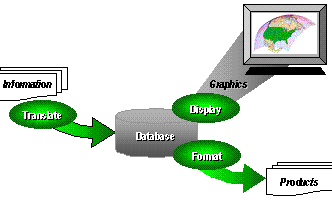 |
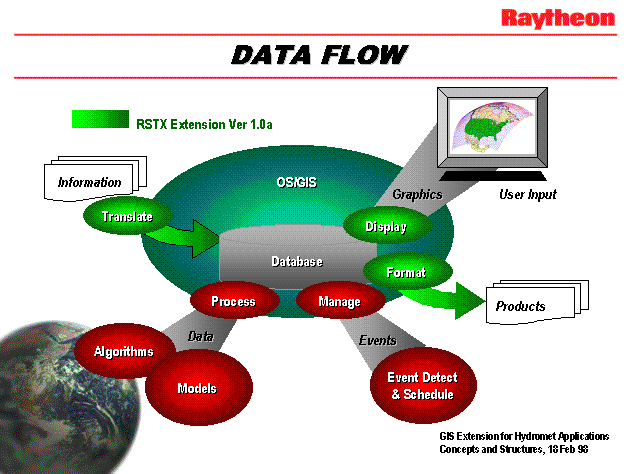
Figure 2: Weather data ingest, display and product processing flow.
The contents of Weather Analyst TM Version 1.0a are identified in green. |
A conventional systems architecture is shown in Figure 2. Data and information are ingested and transformed
to GIS negotiable formats, either "on the fly" or when needed for use.
Intrinsic GIS functions are used to format weather data for display and user interaction, as well as
to produce related products such as weather watches/warnings, maps, statements and reports.
As shown on the expanded diagram, algorithms and models are accessed by exchanging data and
information with external modules, either colocated on the same platform, on an attached network, or remotely.
Events are usually handled separately, since most designers consider events to be objects "of a different color",
or the event modules are produced by an independent team, or both.
Ingest and Display Hydromet Data
The first goal in GIS Meteorology is to convert meteorological data and information to "GIS negotiable" formats.
The following table summarizes the relationships of weather data to GIS formats (or shape), but is not intended
to be exhaustive.
Several examples are provided (some from previous papers).
There are a couple of changes to "business as usual".
The most notable is that images must be provided in standard projections, and
sufficient registration information must be provided in order to construct a World File for each image.
This is not trivial. Ephemeris data may not be current or may also be in error.
Many systems also assume that the satellite image is the "natural" projection, and
maps are transformed to match the greater data volume.
Another change relates to data formats and customary business practices within the weather services.
There are many formats extant for weather data and products, and weather systems must develop
a decoder/encoder pair for each. However, we have found that these products reduce to a few formats,
usually defined by geographic coverage, and a message(s) or datum (data array).
The data/product format field can be simplified, and the formats could also be simplified
so that weather data processing does not require a black belt in meteorology on your staff.
| shape | weather data type | example |
|---|
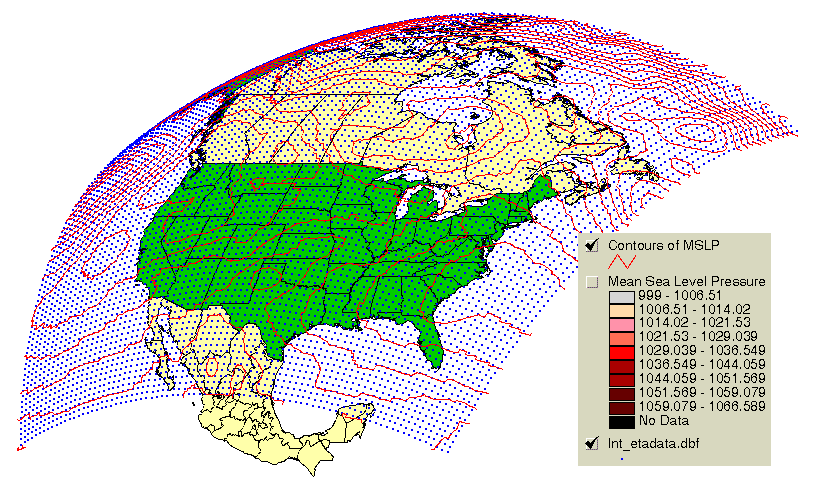
| point | surface obs, rain gage, river gage, pilot reports (PIREPS), model gridpoint data
CASH (real-time airborne obs), lightning, Tropical Cyclone position |
Lightning |
| line | contours, fronts, rivers and river stage, rawinsonde profiles,
roads and road conditions, air parcel trajectories |
ETA model contours |
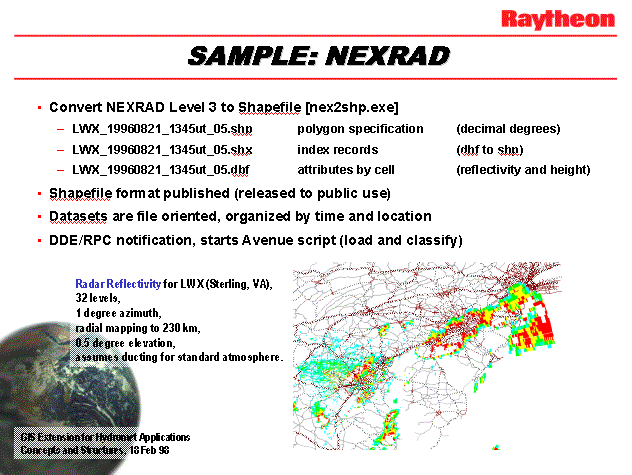
| polygon | radar, watch/warning boxes, area/zone forecasts, plumes (air parcels) |
NEXRAD |
| image | satellite images, FAX charts (DIFAX, NAFAX, etc.) |
DIFAX |
| grid object | Intermediate objects for all data on a surface.
Surfaces include constant height (e.g. MSL), constant pressure (isobaric), and constant
potential temperature (isentropic). |
Figure 3 |
Exploit Instrinsic GIS Functions
The arrival of Esri Spatial Analyst opened the way for serious meteorological analysis, substantially
reducing our need to call external functions.
Various conventional meteorological procedures were prototyped.
Testing is still underway at the time of submission (3 Apr 98).
Procedures demonstrated include:
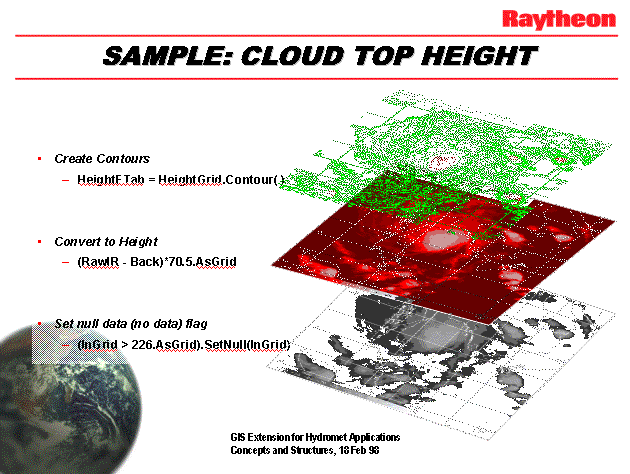
- Cloud Top Height - As shown in Figure 3, infrared image raster data are converted to a grid,
calibrated for radiance, then transformed to cloud top temperature.
Independent information on atmospheric temperature variation with height allows conversion
of brightness temperature to geopotential height (meters above MSL).
The resulting grid is essentially a "DTM" of cloud tops.
This capability is relevant to the analysis of Tropical Cyclone character, e.g. when using the
"DeMarco" method.
- Isentropic Surface Analysis - Atmospheric soundings from rawinsondes (plus satellite and
aircraft observations) are used to estimate the Montgomery Stream Function (MSF) on a surface of constant
potential temperature. Note that ArcView is well suited to calculating the actual geographic
locations of the balloons (they move during ascent to 100 mb and above).
Contours of MSF on this surface can be used to calculate isentropic air parcel trajectories.
- Multi-Wavelength Satellite Retrieval - Selected multi-spectral images from Polar and
Geostationary satellites can be arithmetically combined to estimate "soundings" of meteorological
parameters (e.g. Temperature) and trace species (e.g. water vapor). The trick is knowing which
coefficients are best in the (usually linear) combination of brightness temperatures.
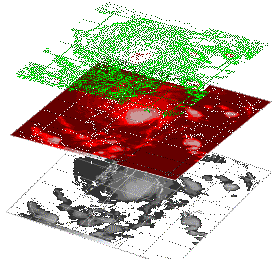 |
Figure 3: Cloud top analysis. Infrared DMSP image of Typhoon Linda over South China Sea
(NRL) is calibrated for brightness temperature and then transformed to cloud top height using
atmospheric temperature profile(s). The result is a cloud top "DTM". |
Support External Functions
One of the most exciting developments for us has been the availability of free real-time weather data
through the
Emergency Managers Weather Information Network,
or EMWIN.
Sporting packet radio transmission of weather data, charts and images from Geostationary satellite
and terrestrial locations, the EMWIN network is providing an important service to those individuals
and organizations needing access to watches and warnings in near-real time.
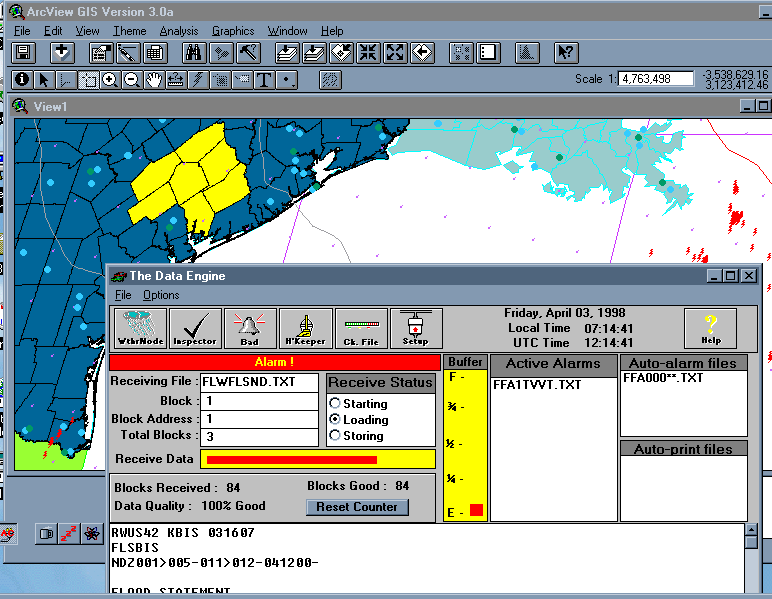
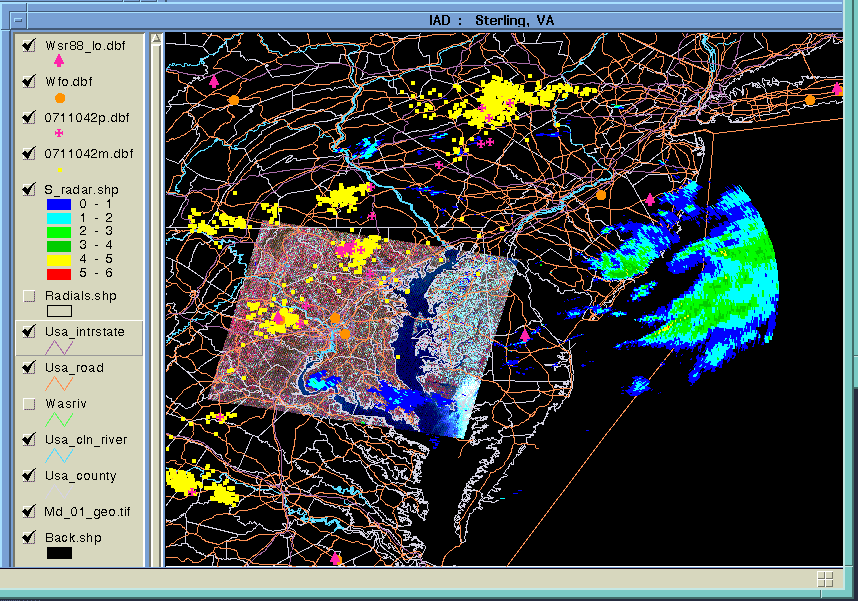
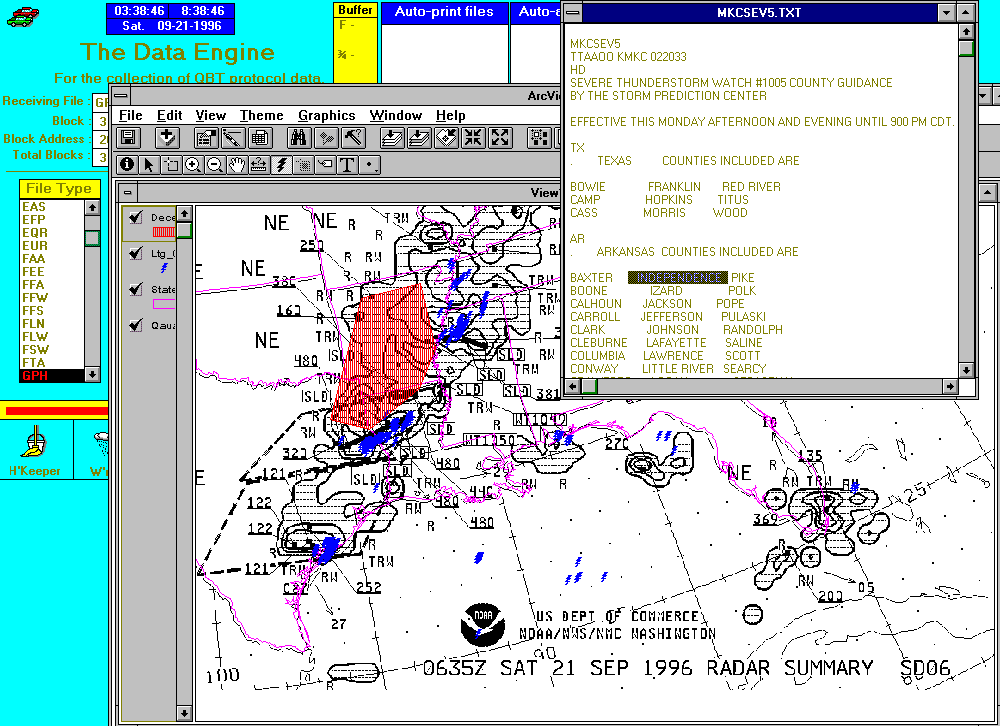
Figure 4 illustrates co-operation of ArcView with the EMWIN Data Engine using commercial "Weathernode"
software and a radio scanner from
Maryland Radio Center, Inc..
This capability is a standard feature of the Weather Analyst TM extension for ArcView.
 |
Figure 4: A simple demonstration of ArcView and EMWIN co-operation in the Texas Gulf Coast area.
EMWIN Data Engine version 3.12 (Beta) coupled to ArcView 3.0a, 1200 baud serial packet radio
using Radio Shack TM PRO-2014 50-channel scanner. Selected signal source is broadcast by NWS
at 400.175 MHz in Silver Spring, MD. |
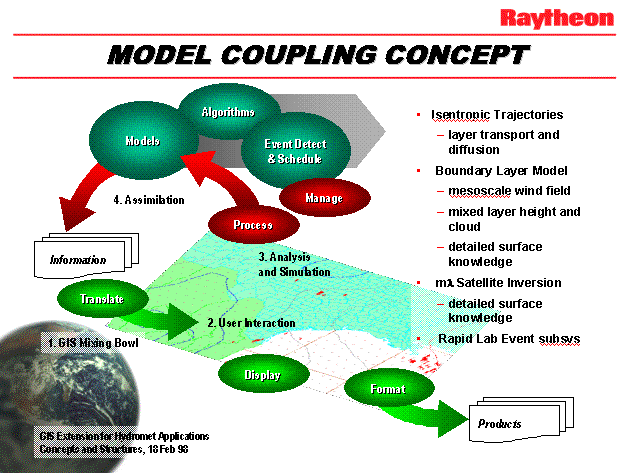
It became obvious to us that the typical GIS-based systems architecture shown in Figure 2 should be
redesigned to account for the streamlining gained through our prototyping with external interfaces
(DDEs and RPCs). This redesign for weather systems is shown in Figure 5. This modification demonstrates
the similarity of external algorithms, models, and other support functions. The closed loop from data ingest (1),
to user interaction (2), to analysis and simulation/modeling (3), is commonly known as the
"data assimilation cycle" (4).
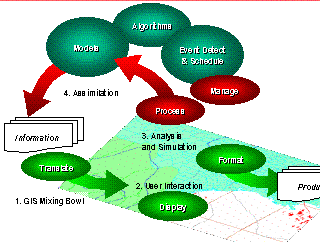 |
Figure 5: A revised view of weather systems architecture, taking advantage of intrinsic functions
and external interfaces supported by ArcView GIS. External modules are accessed using common procedures.
The addition of external modules completes the loop of a "data assimilation" cycle. |
Meteorological "Look and Feel"
We have an informal list of terms which are commonly used by meteorolgists, but which are known
by a different name to those more familiar with GIS. For example, an ArcView "theme" is known as
an "overlay" to NWS field personnel familiar with AFOS (a 1970's weather automation system).
Classification of a theme in ArcView is close to "enhancement" of an image by meteorologists, but
there is little corollary for older weather systems (AFOS does not support color).
Most of our GIS effort supporting the NWS Modernization concerns the development of map databases.
Such databases include NWS forecast zones, marine zones, time zones, political boundaries, etc.
The NWS has selected the Esri Shapefile TM to provide map "backgrounds", which are
considered to be "static" and fundamentally different from the "dynamic" hydromet data which are so
important to all of us.
The NWS effort supporting the development of map databases is publicly available at the
AWIPS Map Database Catalog (AMDC).
Animation
Animation is a key function for weather display and analysis systems. It is clear that
Esri could support animation using frame sequencing from workstation RAM, but such a capability
would be unique to each hardware platform. Commercial frame animation software is also available,
but there remains the issue of coupling the ArcView View object with the animation page or frame.
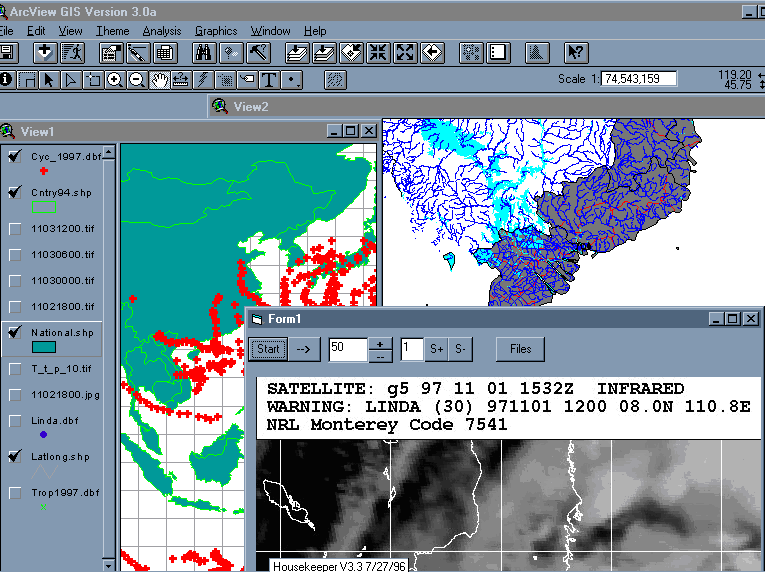
A simple animation function for Windows 95/NT was prototyped using Microsoft's Visual Basic 5.0,
and is shown as "Form1" in Figure 6. ImageMagick was also tested and found to be useful on an
HP UNIX platform.
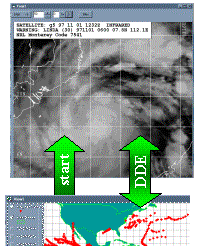 |
Figure 6: Animation provided by an external Visual Basic module "Form1".
Frame functionality was modeled after the University of Wisconsin McIDAS.
The expanded figure shows Tropical Cyclone (TC) tracks for 1997 (View1), with
NIMA VPF data for Viet Nam (View2). Form1 is animating 8 images of Typhoon Linda
retrieved via internet from the Naval Research Lab (NRL). |
We maintain that Esri ArcView 3.0a GIS with Spatial Analyst IS a Weather Processing System.
Most if not all of the functions supported by existing weather systems to our knowledge have
been prototyped with ArcView 3 and demonstrated. ArcView is a Commercial-Off-The-Shelf (COTS)
product. We recommend that organizations developing custom weather applications should at least
examine GIS for potential savings in time and effort.
Acknowledgments
The authors currently support the National Weather Service implementation
of the Advanced Weather Interactive Processing System (AWIPS) under the
Systems Engineering and Technical Support Services (SETSS) contract.
Dr. Shipley is also an Affiliate Professor with the Department of Geography
and Earth System Science, George Mason University, in Fairfax, Virginia.
Many thanks to the Government and commercial organizations cited below for
their encouragement and support. Also, we would like to thank the following
students, all with George Mason University: Akiyo Nishida, Krishan Puri, Ryan Gunn,
Jan Raisinger, and Karen Singley. Special thanks to Roger Shriver, Jim Doherty, David Vercelli
and Fran Curnow (NWS), Bill Ehrhardt and David Beddoe (Esri), and Jerry Johnson
(Maryland Radio Center).
Disclaimer: This paper is not a work of the U.S. Government.
It does not imply endorsement by the National Weather Service or any other
Government Agency. Neither do any opinions expressed represent the views
of the National Weather Service or Raytheon STX Corporation, or any of the
additional contributors cited below.
Contributors include:
- National Weather Service
- Raytheon and Raytheon STX Corporations
- Esri
- World Agricultural Outlook Board, USDA
- Alden Electronics
- GAI
- Kavouras, Inc.
- Atmospheric Research Laboratory (ARL), OAR
- Maryland Radio Center, Inc.
References
Beddoe (1997) GIS Meets Weather Systems Head-On, GIS World, vol. 10, no. 2, pp 52-53.
Brennan and Waddington,
Utility of Spatially Related Data for Managing Agricultural Variability, Esri 1997 User Conference.
Kasraei and Van Zuyle,
Near Real-Time Hydrologic Modeling and Forecasting Using GIS, Esri 1997 User Conference.
Knitis,
Analysis of the Effect of Weather on FEDEX Ground Operations Using GIS, Esri 1997 User Conference.
Shipley, Graffman and Beddoe,
GIS Does the Weather, Esri 1996 International Users Conference.
Shipley, Graffman, Beddoe and Smith (1997)
Rapid Integration of COTS GIS for Interactive Weather Processing,
AMS 13th IIPS Proceedings, paper 13.11, pp 420-421.
Scott T. Shipley & Ira A. Graffman
Senior Staff for Weather Services
Raytheon STX Corporation
4400 Forbes Boulevard
Lanham, MD 20706