MapObjects, ArcView and Visual Basic: Presenting Spatial Data to Non-technical Users
Abstract
The University of Arizona Library instituted a GIS service as part of the Association of Research Libraries (ARL) GIS Literacy Project. Teaching and learning ArcView made it difficult for non-technical users to utilize spatial data without one-on-one assistance. To remedy this situation, we partnered with GIS campus experts to create a user-friendly GIS Graphical User Interface. The interface integrates various geo-processing functions, such as data capture, data management and analytical techniques. A methodology will be proposed to evaluate the effectiveness and friendliness of the GUI.
Introduction
The University of Arizona, established in the 1890's, is a Research One University and a land-grant institution. It serves approximately 35,000 students including 26,000 undergraduates. The University of Arizona Library has collections that total over seven million items and is a Federal Government Depository. These collections include maps and government publications. In particular, the Map Collection has approximately 250,000 items including sheet maps, atlases, globes, and relief models. As a member of ARL, the Library is committed to providing electronic access to resources. In keeping with this commitment, the Library attempted to position itself to serve geo-spatial data using GIS tools and applications.
In the Spring of 1996, two librarians with map expertise created 12 pre-designed Arizona maps using 1990 Census TIGER files, Census data, and ArcView. These maps, fashioned after the Urban Atlas: Tract Data for Standard Metropolitan Statistical Areas (United States Bureau of the Census, 1974), attempted to anticipate user needs and to facilitate the use of ArcView. In addition, a user manual was created to provide users with information on the Library’s GIS services. The user manual included sections such as:
Introduction to GIS and ArcView
Once the user manual was completed, two members of the GIS group held several training sessions for reference staff. The sessions emphasized the importance of GIS for the library, presented topics from the user manual, and demonstrated some of the pre-designed maps. To publicize this GIS service, a presentation was made to a campus-wide group and an article was written for the campus newspaper.
GIS Working Group
It became evident that other individuals needed to be involved with GIS planning, training, and related issues. In early 1996, four more members were added to this group. New members brought to the group additional specialized subject knowledge such as government publications (e.g. census and other data), business and marketing, and science and technology expertise. The six members became known as the GIS Working Group.
The Group's first task was to create a plan that included:
ArcView Training
All members of the Group were expected to provide GIS reference assistance to library staff and customers. It became obvious that in-house training was not adequate. The group recognized a need for formal training. All six members were in need of training; the original two members needed to learn the new version of the software and the new members needed the complete introduction to ArcView. Different options such as auditing a GIS course or using ArcView tutorials were considered. When it was learned that an Esri authorized GIS expert on campus was planning to offer the two-day Introduction to ArcView course to campus staff, the Group decided this was the best option. (This individual teaches UA GIS classes regularly at the Advanced Resource Technology Program (ART) of the School of Renewable Natural Resources - College of Agriculture.)
The ArcView course included training modules, which brought all members to the same level of expertise. With more staff having GIS expertise, customers would have more opportunities to have their GIS needs met. Knowing that the group would have to further train library staff, a GIS guide (pathfinder) was created for using ArcView with pre-designed maps. The pathfinder included basic commands for modifying and printing, step-by-step, easy instructions, sample screens showing charts, tables, graphs, and a quick reference guide to ArcView buttons and tools. Although the pathfinder assisted users with pre-designed maps, it was difficult to anticipate what new maps would need to be created to fit their needs.
Needs Assessment/Survey
The University of Arizona Library is a team-based organization which stresses knowledge of customers’ priorities and the perceived values of Library services. The needs assessment survey method was used to understand the current and potential campus GIS needs.
The Needs Assessment tool contained a series of questions that covered the scale and scope of established teaching or research activities. Data collected included: courses taught; enrollment size and frequency of classes taught; research interests, past history and future plans; and possible roles for the Library. The survey proved valuable for planning future Library GIS services by helping the Group focus on what roles and functions to fulfill. It was essential to develop GIS services that were within the domain of librarianship and not in direct competition or overlap with existing campus GIS services. One outcome of this survey led the Group to explore how ArcView can be more friendly by designing a Graphical User Interface (GUI).
Many libraries provide GIS services in their government documents or maps departments by setting up high-end computer hardware (with spatial data and GIS software) and by offering individual help. At the University of Arizona Library, the two GIS computers are located in the Main and Science reference areas and reference desk staff are trained to provide basic assistance with the pre-designed maps. For more in-depth help, students must make an appointment with one of the GIS Group members. Students who may need to use GIS for a one-time research project are often unwilling to devote sufficient time on their own to learning how to use ArcView and investigating what spatial data to use for their application. The GIS Group’s vision is to reach any user with a geo-spatial topic that would benefit from this powerful imaging and visualization tool.
For the past several years, the UA Library had been meeting with faculty from the School of Renewable and Natural Resources (SRNR) ART Lab on joint committees and projects. It was therefore logical to consult with Craig Wissler, ART's GIS specialist, about the feasibility of such a project. A partnership effort was created between the Library and the ART Lab. In order to make this project a reality, funding was needed to support this effort. Subsequently, the GIS group presented a proposal for one-time funding to the Library Budgetary Group.
The purpose of this one time funding request was to:
Partnership
After the GUI project was funded, the Library's relationship with the ART Lab evolved into a partnership. As a "partner", Craig Wissler works with the Library in several capacities. He identified two GIS graduate students to hire for the project and is also involved in the planning phase of the GUI--defining the GUI concept, identifying initial functionality, and user testing. The ART Lab students, funded by the Library, will deliver a custom GUI product for ArcView. (This includes the design, programming, and user testing of the GUI.)
In keeping with the partnership, the Library would contribute funding for GIS graduate students with high computing skills and GIS expertise. The Library will maintain a GIS network especially for Internet connectivity, FTP operations, file management, and related system planning and design to access and display spatial data files. The Library will also share depository data with the ART Lab. The long-term partnership goal is for both the Library and the ART Lab to deliver public domain spatial data to the campus. Specific advantages of the GUI are to support customer's access by creating a user-friendly application and to support educational activities by integrating GIS into the curriculum.
If the proposal for one time funding had not been approved, the result would have been a less friendly interface. In addition, the lack of in-house library GIS expertise would have resulted in much slower growth rate for this new service. Another negative impact would have been limited Internet access to spatial data through the Library's GIS applications. Ultimately the Library's integration of spatial data and GIS into campus learning and research would have been prolonged.
Project Planning
Planning evolved through several phases: development of the timeline, refinement of the initial GUI concept, and general and final product design. This project has a start date, completion date, and objectives. Since the project was funded for one year, it was imperative the project have a timeline with deadlines for specific phases.
In order for the project group to start planning the GUI’s functionality, some general questions needed to be answered. What did the GUI need to do? What ArcView functionality would it include or not include? Some of the functionality identified were: querying the database, creating an ArcView project, printing maps, downloading data to a disk and integrating data from multiple sources. Additional questions that arose included: could data from multiple sources be integrated, how should data incompatibility be handled, and what is the most efficient way to zoom in on a geographic area?
After the group discussed what general functionality should be included in the GUI, several low-end products (ArcExplorer and ArcVoyager), and several web sites were reviewed. These web sites Pennsylvania Statistics by Map, Massachusetts Electronic Atlas, and Virginia County Interactive Mapping, in particular, provided design ideas on how to structure a map or data request.
Once the general product features were agreed on, the specific functionality of the GUI needed to be designed. The different areas of functionality included were data capture, data management, analytical techniques, and display features. Data capture includes data integrity checks, output data file creation for the user, and data file download and upload from multiple sources. Data management includes relational file support maintained by the database software. Analytical techniques include theme on theme queries/selections and overlaying of themes. Display functionality includes printing and exporting of maps.
Programming
As the project progressed and the programmer began working closely with one of the data sets, the enormity of the project (as originally defined) came into focus. It became obvious that the scope of what data sets would be programmed into the GUI and the geographic scope needed to be narrowed. A subgroup on the project team had been working on an inventory and evaluation of spatial data on CD-ROM acquired as part of the Federal Government Depository program. Besides providing basic descriptive information, each spatial data set was evaluated for its ease of use with ArcView. The Census of Population and Housing and the Census of Agriculture, both limited to Arizona, were chosen as the first two data sets to be programmed into the GUI. Programming components included the following:
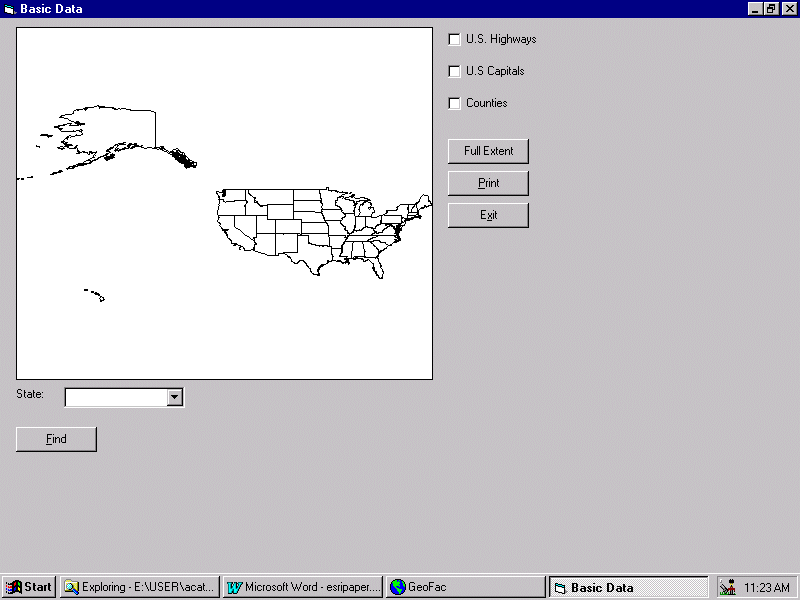
To start the project, the group used a data set provided by Esri called "Basic Data" (included with MapObjects). Functionality of the first data set was kept very simple and included the following:
1. Display a map of the United States
2. Toggle map features (highways, state capitals, and counties)
3. Print a map of the United States
4. Zoom in and out
5. Provide a simple search to find a particular state.
The following image shows the layout of the interface.
Future Plans
As the paper is being prepared, the Group is still in the midst of designing and programming the GUI. This section reflects our future plans for testing and evaluation, training and updating the GUI.
Testing and Evaluation
The GUI is being designed to enhance the novice users’ self-sufficiency in the operation and use of GIS; therefore, a necessary component is evaluating the interface for usability. The Group developed two phases for the evaluation process. The first phase "Heuristic Evaluation" will check the interface against accepted usability standards. The second phase "Formal Usability Testing" tests the interface with actual customers. Below, each evaluation phase will be described, why that method was chosen, and how each phase was developed.
Before formal usability testing is done, the interface needed to be tested for conformity to accepted usability standards. The heuristic evaluation method uses a small group of evaluators to check the interface for compliance with known usability principles. A form was developed based on Nielsen’s Ten Usability Heuristics (See GUI Design Handbook Appendix B), a rating scale to score each criterion was added, and space was provided for comments on specific results. Once the results are compiled, discussed with the programmer and agreement has been reached on changes to be made, then the evaluation process will move into the Formal Usability Testing phase.
Formal usability testing will determine the ease of use and intuitiveness of the interface. Since many library staff have never used GIS, participants from this group were selected to do our initial formal usability testing. This evaluation phase will be set up quite differently from the heuristic evaluation phase. In each testing session there will be one participant, a facilitator and observers. The facilitator will give the participant instructions and a task scenario, encourage the participant to say out loud what they are thinking, and keep the test on schedule. The observers document what each participant does, their reactions and comments. At the end of each session, each participant will be debriefed to find out any areas of confusion, to share new development ideas, and ask them how well the interface meets their expectations. Then all observers' notes will be categorized, prioritized and summarized so that, when possible, they can be incorporated into the next interface upgrade. Once this final evaluation phase is complete, then other data sets can be programmed into the GUI.
Training
After the GUI is developed, the Group will develop training sessions for all Library staff. In the initial stage, these sessions will include:
The Group is planning on-going training sessions (2-3 demonstrations or more as needed) to reach out new Library staff, faculty and students. The Group plans to update the handouts on a regular basis.
Updating the GUI
In the next two years, the Group anticipates that ten additional spatially-referenced data sets will be integrated into the GUI. This may include converting existing spatially- referenced data sets to ArcView format; maintaining and updating the GUI; enhancing GUI functionality; and continuing to explore new products and technology. State and federal government document spatial data will continue to be evaluated for compatibility with ArcView. Other areas of enhancement include connecting to spatial databases at the ART Lab, providing public access to spatial data the Library owns, and investigating the possibility of providing remote access to the GUI.
Lessons Learned
As the project developed there were two different points of view for adding new features to the application. From a non-programming point, adding new features was simply a question of conceiving the idea. Whereas from a programming point of view, different aspects had to be considered that were not obvious to non-programmers. For example, one of the features that had to be created in the project was the ability for the user to click a button that would print a map. This is a very simple feature to add from a non-programming point of view. However from a programmers view, many different things had to be accounted for like page orientation, scale, legend, title, printing to a printer, printing to a file, etc. In the case of printing, the Group chose to keep printing features very basic and allow the user to only change the page orientation.
The project is taking longer than anticipated and the Group learned to be flexible with timelines and deadlines. Each data set has its own unique characteristics and needs to be programmed individually. Once user testing and evaluation is completed, other learnings will become obvious that did not occur to the Group. Librarians could not take on this project without establishing a partnership that included individuals with GIS expertise.
The Group’s diversity created unforeseen advantages and obstacles. Integrating individual’s specialties into the project helped to bring in a wide variety of perspectives. On the other hand, team size, workloads, and differences in individual’s backgrounds made it difficult to stay on a focussed path. It is difficult to convince our teams that the GUI is a worthwhile project. It is seen as a labor-intensive project reaching a relatively small number of students and faculty with a long time-line.
Conclusion
The Library’s current position and vision is to make ArcView, a high-end GIS system, available to novice users on campus. This is an ambitious project to educate the entire campus to the impact and promise of GIS. The Library should be proactive in promoting this unique interdisciplinary tool beyond traditional subject areas.
At this phase, while the potential for success and demand is still in question, hopefully the GUI project will be a launch vehicle to help the Library realize its GIS vision. This project is the key to defining the level of service the Library can offer to the University community, especially undergraduate students.
The viability and longevity of the GUI can be viewed like any software product that finds itself subject to the competitive information technology marketplace. GIS is one of the fastest growing applications in the computing industry. In the context of the Library, the customers use and how the GUI is promoted, introduced, taught and updated, will determine its value. The GUI’s ability to assist novice users will be seriously tested. The entire success of the Library’s GIS initiative rests on the success of the GUI.
Averill Cate, Jr., GIS Graduate Assistant, University of Arizona Library
Robert Chang, Science-Engineering Librarian, University of Arizona Library
Elissa M. Cochran, Social Sciences Librarian, University of Arizona Library
Christine E. Kollen, Social Sciences Librarian, University of Arizona Library
Atifa R. Rawan, Social Sciences Librarian, University of Arizona Library