Kimberly Patraw, Pat Terletzky, and Doug Ramsey
Using ArcView 3.0, the Spatial Analyst Extension, and Avenue to conduct a
kriging process on ecological data
Abstract
The Army National Guard Bureau (ARNGB) is responsible for maintaining the condition of the land upon which it trains. Achieving sustainable use of training lands requires monitoring and inventory of land condition. Utah State University, in conjunction with ARNGB, has developed an environmental analysis package for use by ARNGB managers. The package can be used to compare land condition trends with military usage and environmental trends. Using the Spatial Analyst Extension and Avenue programming, the package provides display and analysis capabilities including identifying spatial correlations, kriging, and probability calculations.
INTRODUCTION
This code was written as part of the Integrated Training Area Management (ITAM) program, developed by the U.S. Army Construction Engineering Research Laboratory (USACERL). The purpose of the ITAM program is to integrate Army missions and training with proper natural resource management. This is achieved through monitoring, inventory, and education (U.S. Army, 1995). Biological data, collected on National Guard Bases through out the country, indicates which plant and animals are present and their densities. Since data is collected at least every other year from permanent transects, it is possible to examine the data for temporal and spatial changes. Military data is also recorded and indicates what type of military use occurs, where it occurs, and when it occurs. Examining the ecological and military data allows for statistical analysis of relationships within and between these two categories of data. Basic parametric statistics can calculate mean, standard deviation, and mode, in addition to more advanced calculations such as linear regression, analysis of variance (ANOVA), and multiple ANOVA. These types of statistics do not have the capability to integrate spatial data and thus exclude other potentially important factors.
To incorporate spatial data, we used a kriging process.
Kriging is a statistical method of estimation and predication,
based on point locations, in which estimates are weighted and an
estimate of the variance is calculated (Isaaks and Srivastava,
1989). Kriging has the added advantage over other predictive
Heisel et al. (1996) used kriging to examine and map
distributions of a common annual weed species at different
sampling distances. The result of the kriging was a
distribution map of the weed based on the sampling points
(Heisel et al., 1996). Comparison of the two grid sizes indicated
that the smaller grid produced a more accurate distribution than
the larger grid. We used kriging, based on a plant species frequency
of occurrence, to interpolate values for areas that were not
sampled. The program was calculated completely within Avenue
and run in ArcView with the Spatial Analyst Extension. STUDY AREA The data was collected at the Orchard Training Area (OTA),
located near Boise, Idaho. Most of the 138,551 acres are desert
habitat dominated by desert shrubs, perennial grasses, and
annuals. METHODS
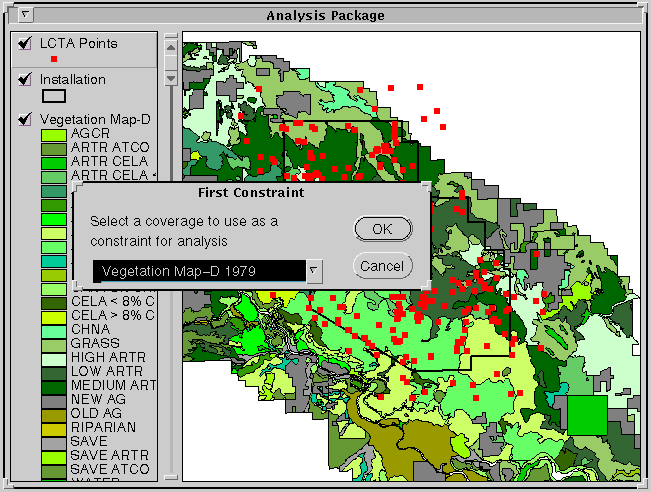
The first selection allows the user to select a broad category, generally a biological or physical theme, using simple "if-then-else" and "MsgBox.MultiListAsString" statements. The second and third selections prompt the user to choose a subsection within the proceding selection.
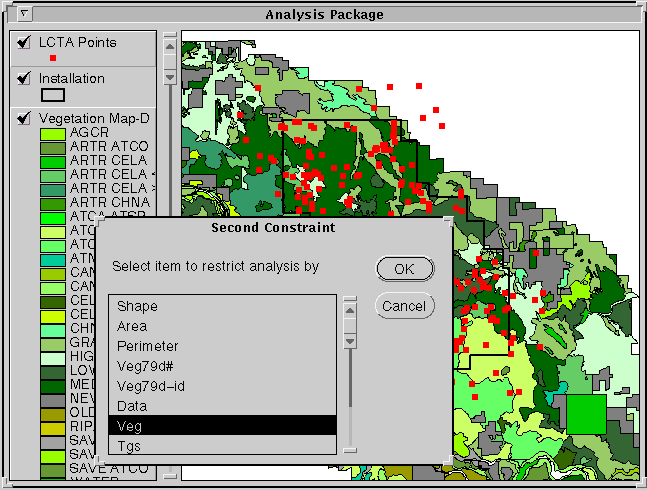
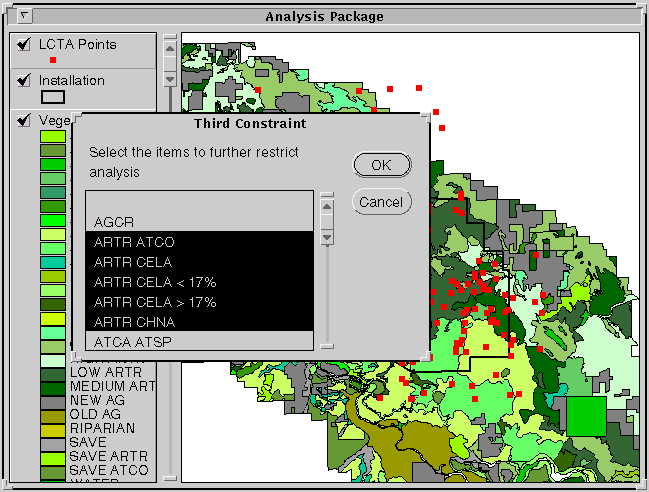
Finally, the user is prompted to select a species from the list of species present in the final selection.
In this code, frequency of occurrence is used as the variable to krig. Frequency of occurrence counts the presence/absence of a species along a transect. It is calculated by totaling the number of locations the species is present at divided by the total number of locations possible. The following code results in a bitmap that consists of only the points that are contained within the selected polygons.
'Identifies the selected polygons in cov_attble and the LCTA 'points that are within them (cov_lctaid)
lctathm = theView.FindTheme("LCTA Points")
lctathm.SelectByTheme(cov,#FTAB_RELTYPE_INTERSECTS,0,#VTAB_SELTYPE_NEW)
The kriging procedure required a coverage so a shapefile was created from the feature attribute table of the selected plots. A field is added to the shapefile that has the values of the paremeter that is being kriged.
'Creates a shapefile of lctathm (new_theme) that has the selected plots highlighted
lcta_FTab = lctathm.GetFTab
if (lctathm.CanExportToFTab) then
nwthm = av.GetProject.MakeFileName("KrigTh","shp")
nwthm = FileDialog.Put(nwthm,"*.shp","Name the new theme")
new_FTab = lcta_FTab.Export(nwthm,Shape,True)
new_FTab.SetEditable(True)
ecofact = Field.Make("EcoFactor",#FIELD_DECIMAL,6,2)
new_FTab.AddFields({ecofact})
if (MsgBox.YesNo("Add shapefile to the view?","Convert to shapefile",True)) then
new_Fthm = FTheme.Make(new_FTab)
theView.AddTheme(new_Fthm)
theView.GetWin.Activate
new_Fthm.SetActive(True)
new_Fthm.SetVisible(True)
else
MsgBox.Info("Good-bye, can't continue without a shapefile","")
end
else
MsgBox.Info("Error in program -- Exiting","")
EXIT
end
This results in a shapefile with only the selected plots in the limiting polygons. The next step is to link the Ftab of the shapefile to the table that has information on the plot itself. A species could be encountered more then once at each location, since the individual plant could be encountered at different heights. The code to calculate frequency of occurrence had to count a species only once at each location.
'Calculates the frequency of occurrence for each of the selected plots
for each rec in new_FTab
loc = 0
x = 0
krigbmap.ClearAll
krigbmap.Set(rec)
new_FTab.Updateselection
aerbmap = aercov_VTab.GetSelection
aercov_VTab.UpDateSelection
bnum = aerbmap.Count
if (Not(bnum = 0)) then
for each record in aerbmap
if (aercov_VTab.ReturnValueString(aer_vegid,record) =spp_chc) then
if (NOT(aercov_VTab.ReturnValueNumber(vegloc,record) =loc)) then
x = x + 1
loc = (aercov_VTab.ReturnValueNumber(vegloc,record))
end 'second if
end 'first if
end 'for statement for aerbmap
else
x = -9999.00
end 'if (Not(bnum))
' Fills in Freq. field in the
new_FTab.SetValue(ecofact,rec,((x/100)*100))
end 'for statement for krigbmap
eco = new_FTab.FindField("EcoFactor")
for each a in new_FTab
if (new_FTab.ReturnValueNumber(eco,a) = -9999.00) then
new_FTab.RemoveRecord(a)
end
end
This results in a frequency of occurrence for the selected species. The kriging procedure is conducted on each point (the individual plots) with the corresponding frequency of occurrence as the values being used in the kriging calculations.
'----------------------------------------------------------------
'Kriging Procedure
'----------------------------------------------------------------
Grid.SetAnalysisCellSize(#GRID_ENVTYPE_VALUE,30)
Outfn = "/auto/ned01/temp/Outfn".AsFilename
Interpfn = "/auto/ned01/temp/Interpfn".AsFilename
KRG = Interp.MakeKriging(#KRIGING_SPHERICAL,NIL,NIL,Outfn)
Interpgr=Grid.MakeByInterpolation(new_FTab,Prj.MakeNull,eco,KRG,NIL)
Results
The interpolation results in a display that has a gradient of values that rang from high to low. The high values are associated with dark colors, low values are colored white and intermediate values associated with a gradient of colors from dark to white.
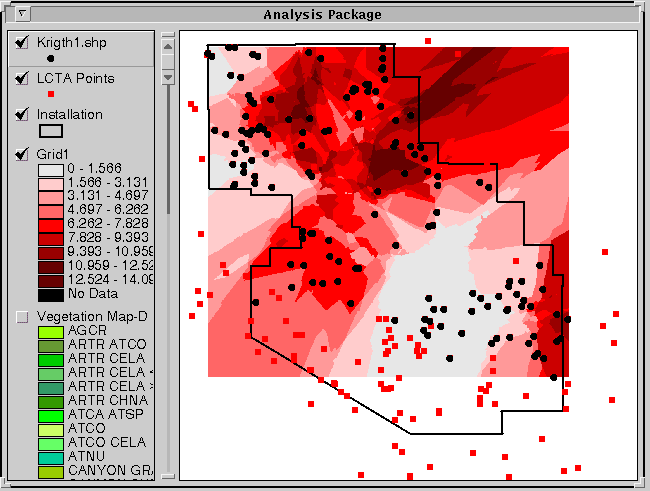
The above display indicates that dark areas have a high frequency of occurrence for the selected species, in this case sagebrush. Density decreases as the color become lighter. Thus, in this example, managers could identify areas with high sagebrush concentrations.
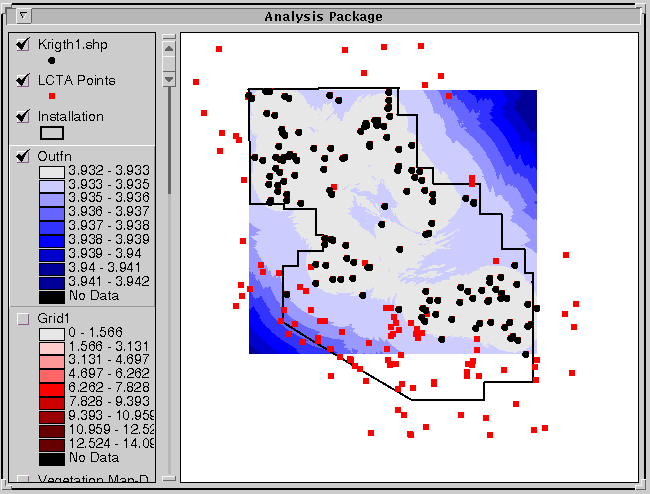
Along with the prediction model, the residuals can be displayed. Residuals indicate the strength or certainty of the model. The residuals display is opposite that of the prediction values, so areas with a high degree of certainty appear white. Areas of low certainty are associated with dark colors. Thus, where the model uses many points to estimate values, there is a high degree of certainty and appears white in the residuals display. The user may accept the models prediction in these areas with more confidence than areas where the residuals are high and had a deep color. Conclusion This code allows user input into the kriging procedure and results in a predicted distribution of an ecological parameter. This model predicts values over areas that have not been sampled. This predication allows managers to use limited resources more efficiently. An Extension will be created in ArcView for prediction and estimation. The Extension will include this kriging code and a probability code. The probability code will calculate the probability that a particular species with occur in a particular place.
REFERENCES
Heisel, L., C. Andreasen, and K. Ersboll. 1996. Annual weed distributions can be mapped with kriging. Weed Research 36,325- 337.
Isaaks,E. and R.M. Srivastava. 1989. An introduction of applied geostatistics. Oxford University Press, New York.
U.S. Army. 1995. Integrated Training Area Management (ITAM) Program Strategy. Office of the Deputy Chief of Staff for Operations and Plans. Washington, D.C.
AUTHOR INFORMATION
Kimberly Patraw, Project Specialist
email:kimp@nr.usu.edu
Department of Geography and Earth Resources
Utah State University
Logan, Utah 84322-5240
Pat Terletzky, Rs/GIS Programmer 1
email:ned01@gis.usu.edu
Department of Geography and Earth Resources
Utah State University
Logan, Utah 84322-5240
Doug Ramsey, Associate Professor
Acting Director, RS/GIS Laboratory
email:doug@nr.usu.edu
Department of Geography and Earth Resources
Utah State University
Logan, Utah 84322-5240