[NOTE: An updated version of this paper may be found at
http://www.mandli.com/papers]Due to the widespread availability of computer networks, it is becoming increasingly desirable to make your GIS solutions available to your users on your Intranet or the Internet, via the web. The focus of this paper is how to make your custom GIS solution available over any web capable network, using Mandli Communications' Roadview® Explorer as a case in point. This paper can be used as a guideline for developing your GIS solution on the web, highlighting your choices along the way.
Deploying your application on the web is beneficial because it allows ubiquitous access to the functionality and data that your application provides, from any networked location whether local or remote. Also, deploying an application via the web can save on distribution costs, and maintenance headaches. Web enabling Roadview® Explorer has allowed our customers to provide their users access to data and images from anywhere. Upgrades can also be performed to either the client or the server components of the application transparently to the user, and without any user intervention.
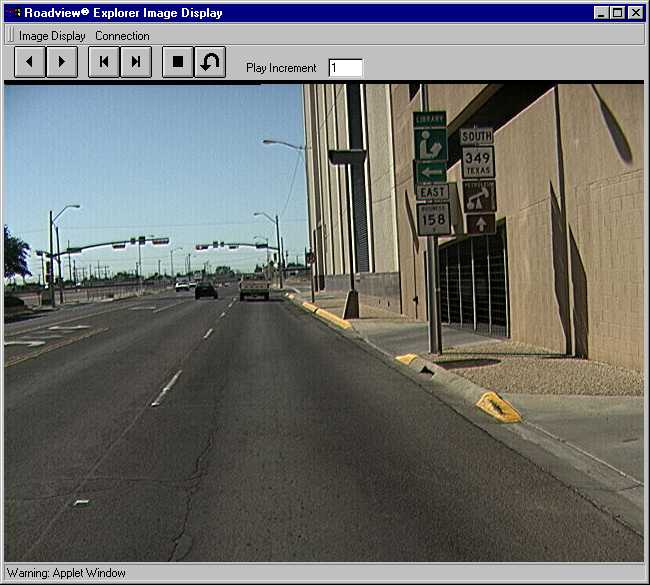
Mandli Communications' Roadview® Explorer is a custom application used primarily by Departments of Transportation (DOTs) to provide access to geo-referenced videlogged highway images. It also provides the ability to execute queries against legacy databases.
Roadview® Explorer is implemented as a distributed client-server application. In previous incarnations, Roadview® was implemented as a standalone application, to be used in conjunction with Esri's ArcView, or Bentley's MicroStation, which provided the map interface. By moving to a distributed client-server architecture, our customers can now give access to their rich data set to all of the potential users within their organization, rather than just the select few that had the required software. Previously, the required software cost several thousand dollars in licensing fees, which had to be paid for each user, regardless of whether they were a frequent or casual user. Now, potential users need only have a Java enabled browser to use Roadview® Explorer, and the cost is only for the single MapObjects and MapObjects Internet Map Server (MOIMS) deployment license.
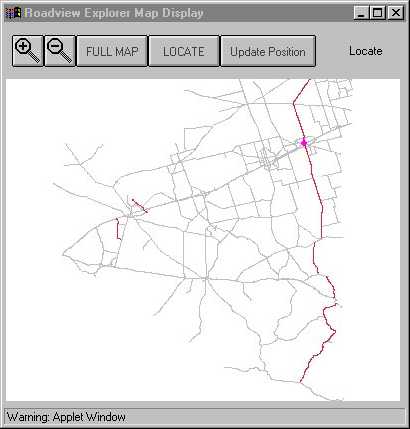
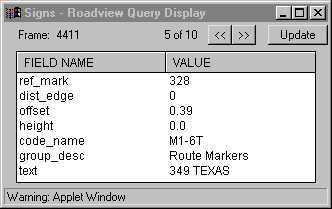
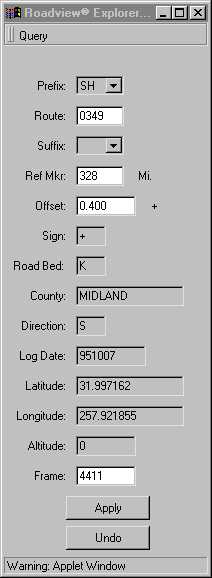
There are screen shots of Roadview® Explorer available at the end of this document.
The client side of your application is the facet your users will directly interact with in accomplishing their goals, and as such, it must be tuned to the needs of those users. These needs will dictate the design decisions you make in building the client, and can affect your choice of language, delivery medium (browser-based vs. standalone), feature set, and functionality. Many of these choices are domain specific, and can't properly be discussed in this paper. However I will discuss language choice, as it can have a big effect on what your solution will be able to accomplish, and how easy it is for you to provide the functionality you need.
The language you choose depends on your target audience, and your own preferences. If you want your application to run in a web browser, you will probably choose either Java, or a browser scripting language, such as JavaScript, JScript or VBScript. You can also write your client-server solution as a standalone application, in more traditional languages such as C, C++, Delphi, or the language of your preference. You could even write a standalone application in Java, though not necessarily as a Java applet. (For a clearer explanation of the difference between a Java applet, and a Java application, see www.javasoft.com)
Writing your application in Java will allow it to run in a web browser, with the applet code downloaded only when the user needs it, requiring little or no installation for the user. For a detailed discussion of what Java is, and why it gets all the hype that it does, again visit www.javasoft.com.
The client side of Roadview® Explorer is implemented as a Java applet, runnable in any browser with Java support. We chose Java for a number of reasons. Java applets do not need to be installed on the user's computer, and execute within the popular browsers, which any computer with web access will certainly have, or can be obtained easily. Both of these issues were a concern, since we wanted the occasional user to have to do as little as possible to get up and running with Roadview®. No-nonsense access to the images was what was desired. We decided not to use JavaScript or VBScript because of their limited functionality for multiple windows, and client-server communications. All of the communications between the client and the server are done over HTTP, through a web server. These "conversations" require the interpretation of the plain-text response of the server. This would have been difficult, at best, in a scripting language.
Using a scripting language for building the client-side portion of your application will let you provide a very lightweight client for your customers. The code will exist simply as a series of web pages, possibly connected together using HTML frames. If you can design your application within the limitations that scripting languages enforce this solution will provide the quickest access time for your users. One important thing to keep in mind is that programs written using browser scripting languages usually behave more like an interactive web-page, than like a standalone application. I'll leave to you the decision of whether this is a good thing or a bad thing.
The decisions you make for implementing the client side will directly affect your user's experience while using your application. This is your user's only interface to your solution's functionality, and as such, it should be custom tailored to the needs of your target audience.
The server portion of your application is where most, or possibly all, of the actual functionality of your GIS solution will be implemented. (Although it's unusual, your client could be used solely for the display of the information provided by the server). In most cases, the client side of the program is used for some data collection, such as clicking on a map point, providing search parameters, etc. Once the client has gathered the necessary information from the user, it is submitted to the server side for processing. This is where the bulk of your application specific logic will be located. One important thing to note is that the choices you make in the design and implementation of your server will usually have little impact on the client, other than the speed with which the desired information can be obtained. As such, there are different sets of decisions to be made regarding the server.
Because of the growing need for security on private networks, many network administrators place their networks behind a networking firewall. In order to provide web access to computers inside the firewall, the network administrator will designate a computer, known as a proxy, to provide web access to the outside world. By providing access to your server via the HTTP web protocol, you can take advantage of this security network, without the need to set up special network access privileges. This is where the MapObjects Internet Map Server (MOIMS) comes into play.
MOIMS consists of two pieces, the WebLink control, and the Esri web server mapping extension, which are used to augment the regular MapObjects ActiveX control. If you have an existing MO application, you can simply add the WebLink control to your project, and add some code to handle requests from the WebLink control. For detailed information on how to use the WebLink control, see the MOIMS documentation. The Esri web server mapping extension is provided as a DLL (either Esrimap.dll for ISAPI compliant web servers, or Esrimapn.dll for Netscape compliant web servers), that can be accessed by the client portion of your application to submit requests, in a form such as:
http://www.myserver.com/scripts/Esrimap.dll?Name=MyServer&Cmd=aRequest
All client-server interactions are coded in this manner, with the client making requests of the server, and the server providing an appropriate response, either with the requested data, or some sort of error information. In the case of Roadview® Explorer, the data returned by the server is not directly displayed to the user. Rather, the data returned is in a structured format that can be interpreted by the client, pulled apart into component data chunks and displayed, as appropriate, to the user. This is one of the benefits provided to us by using Java. Rather than have the server generate a web page in HTML format, appropriate for direct display to the user, we were able to interpret the data in a raw, but structured format, and use Java "frame" windows to present the information to the user as needed. In our case, this made more sense, due to the type of information being transmitted. However, each application is different in its needs - in your case it may be better to simply have the server generate a web page, and expose that directly to the user.
Your choice of language for developing server component of your solution is less important than it was for the client component. For Roadview® Explorer, we chose to do the majority of our development in C++, due to our familiarity with the language. Also, to be able to support very large numbers of simultaneous users, we wanted to be able to control exactly what was happening in our extension.
The mapping portion of our server was implemented separately from the portion that performed database looks and data manipulation for the client. We implemented our mapping server as a Visual Basic (VB) application, using MapObjects and the MOIMS. The Esrimap.dll ISAPI extension was used to access this VB application from the client. Map requests in Roadview® Explorer are generally of the form:
http://www.roadview.com/scripts/Esrimap.dll?Name=RoadviewExplorer&Cmd=GetMap...
These maps are used as a point and click interface, allowing the user to specify the portion of the highway for which they would like to see video images. We had initially planned to expose both the data query functionality and the mapping functionality through the same ISAPI extension DLL, all implemented in C++. However, we ran into some difficulties using the MapObjects control in our ISAPI DLL due to system imposed restrictions. Hence, the two separate server components.
Your choice of data storage mechanism will also vary, depending on your preferences, required speed, development time, and a host of other factors. In our case, we chose to store all of our data in SQL accessible databases, and to access that data via the Open Database Connectivity (ODBC) protocol. This provided us with great flexibility in our choice of storage capabilities. If a customer has a license for a large-scale DBMS, such as Oracle, Sybase, or SQL Server, ODBC drivers are available to provide our server component with the ability to access them. For smaller installations, ODBC drivers are available to allow the server component to retrieve data from Microsoft Access databases, at a much lower cost. Another advantage to using ODBC is that the SQL database provider may be on the local machine, or remotely executing on a separate machine, using the network to transmit only the relevant data. Using a remote DBMS can provide significant execution speed savings on the web server machine, increasing the number of users your server component is able to support. It's important to note that ODBC can be used in both C/C++ applications and in VB applications, as well as a number of other languages.
By moving to a distributed client-server architecture, you can make it much easier to maintain the application, and much easier for your users to access your application. The core of your functionality can be upgraded or replaced at any time, without affecting your users. If you have bandwidth issues with large numbers of users, more machines can be placed in service on the client-side, and a variety of load-balancing schemes can be used to maintain a good experience for the user.
Moving Roadview® Explorer to this style of architecture has dramatically improved the user experience for our customers. Their users have increased availability to their data, and their overall costs are lowered as a result. Doing the work to gather your data can be a hard and expensive job. Why not make it available to as many people as possible?