Kristi Lombard
Matthew McKnight
Map Objects has allowed developers to create specialized GIS applications for a wide variety of uses. The modularity of the development environment allows programmers to include only the functionality required for their application.
This paper describes an application that enables users to interact with geographic data in a manner that they are familiar with if they are current ArcView users. This has been achieved by implementing the interface standards in a manner similar to ArcView. A key factor was the implementation of a theme based GIS. This was done by implementing a theme class, where each layer added to the project is a theme object (an instance of the theme class). The table of contents is tied to the theme class in a manner that enables the user to interact directly with themes as they do with ArcView.
Some basic GIS functionality, such as buffers and theme editing have been incorporated into the application. In addition, the ability to create routes interactively, to create regions of interest, and a connection to Lotus Notes using VBLink are discussed.
This paper describes some techniques behind the development of a MapObjects application within a Microsoft Visual Basic (VB) environment. First, the application is described and then techniques for creating the desired functionality are described.
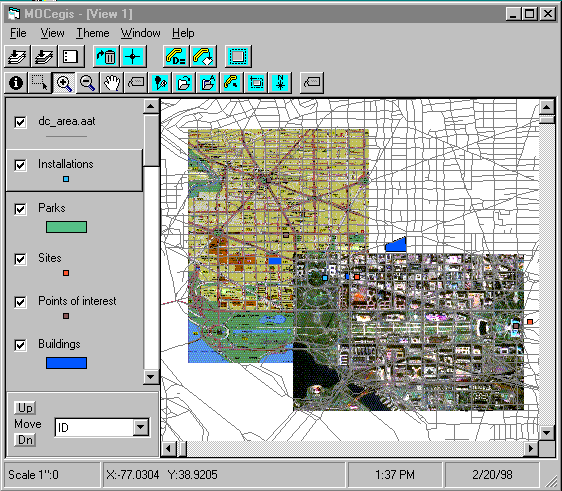
The application is designed to allow users to view and query their data, as well as perform some simple GIS analysis such as buffer analysis, distance calculation and theme editing. The viewing portion of the application was designed in a manner that enables users to interact with geographic data in a manner that they are familiar with if they are current ArcView users. In developing the interface, we devised a "Table of Contents" which, similar to ArcView, allows users to select themes, check themes on and off, change the drawing order of themes, and modify the symbology by using a Legend Editor. In addition, users can add themes and delete themes from the map display.
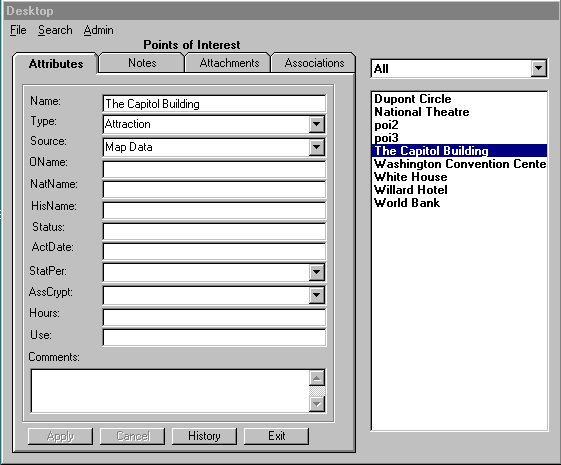
Some of the data in the project is connected to a database. We created an interface for accessing records in the database by clicking on the map feature they are associated with.
There are several obvious advantages to using MapObjects to replace our existing ArcView application. For the most part, our users are novice computer users, and not interested in using many of the advanced functions that ArcView provides. They were unhappy with the time it took for our ArcView applications to load. Therefore, it seemed in everyone’s best interest for us to develop a faster and more compact application. However, for our more advanced users, we still wanted to maintain a lot of the functionality provided by ArcView. We determined that there must be a customizable element to our application whereby users could be presented with the amount of functionality they wanted.
Taking all of these factors into consideration, our job was to recreate with MapObjects the necessary parts of our ArcView application and leave out the extras that were hurting our performance and usability. We chose to use Microsoft Visual Basic (VB) to create our application. VB offers rapid prototyping capabilities, a bevy of development tools to make the job easier, and produces decent executables.
With the set of objects provided by MapObjects it is easy to plug them into a VB project and develop a simple application. The properties and methods of MapObjects make it possible to perform the basic GIS functions of displaying, zooming, panning etc. The main job of the developer at this point is setting up the buttons to call the right methods. However, when you are developing a more complex application, you eventually have to add your own objects to extend the basic abilities of the product. What this paper will describe in some detail is the particular techniques we used in developing a MapObjects application that resembles ArcView.
The programmer can not alter the classes provided in the MapObjects .OCX file. There are a number of ways to associate additional methods or properties with these classes. We explored several of these techniques which will be described below.
The preceding MapLayer properties described in the introduction can be accessed directly from the MapLayer object. A complete listing of MapLayer properties follows:
|
PROPERTY |
TYPE |
|
AreaOfInterest |
Rectangle |
|
Extent |
Rectangle |
|
Indexed |
Boolean |
|
LayerType |
Integer |
|
Name |
String |
|
Records |
Recordset |
|
Renderer |
Object |
|
ShapeType |
Integer |
|
Symbol |
Symbol |
|
Tag |
String |
|
Valid |
Boolean |
|
Visible |
Boolean |
In developing our application, we found the need to store additional information about map layers. These included:
1. The ability to see which maplayer(s) are selected.
2. Full pathname of the map layer
3. Value map renderer, if applicable
4. The index of the corresponding layer object in the collection of map layers that is a property of the map object.
5. Which feature(s) are selected, and the ID for each.
Originally we stored this information in arrays. The arrays were the size of the number of layers. The first array, used to determine which map layers were "selected", stored Boolean values, initialized to False. When the user selects the theme in the Table of Contents, the corresponding index value array is set to True. Three additional arrays were used to store the full pathname, the value map renderer objects and index values, respectively
Lastly, an array was used to store the selected features for each layer. We used an array of collections, one collection for each map layer. Each collection then has one or more objects (features that have been selected). We also maintained a parallel array of collections to store the feature IDs of selected features.
When the application is opened, if any current layers already exist in the project (previously saved, as described later in this paper), the arrays are initialized for those layers. If a layer is added or deleted, or the drawing order is changed, the arrays would be reset so that each array index corresponds to the correct map layer.
Using parallel arrays to store the layer information proved to be an adequate, but inefficient, means of maintaining information about MapLayer. Since this method was not particularly modular, it proved to be difficult in terms of code maintenance because, if additional information was required (i.e. adding another array), it involved modifying code in multiple places.
A more direct method of storing this information is to create a specialized class, "clsLayerInfo". Attached to this object are the properties that were formerly stored in arrays. When a layer is added to the project, a new instance of clsLayerInfo is created. If a layer is deleted, the instance is removed (along with the corresponding property values). If the drawing order of map layers is changed, the clsLayerInfo maintains the correct properties, as the properties are independent of order.
A fundamental capability that users desire is to save their current work so that they can return to it later. Thus, one aspect of ArcView that we deemed it necessary to copy, at least in part, was the project file. This way, when they re-open the project, the existing settings (drawing order, symbology, etc) are maintained. However, like our application, our version of the project file was stripped down to the minimum information necessary to recreate the user environment. We need to know enough information to be able to populate our theme classes and create the display.
The following general information is required:
|
Number of Themes |
|
Extent of Map |
|
Title |
The following information is required for each theme:
|
Name |
To display in the TOC |
|
Path |
To set up the dataconnection |
|
Filename |
To specify the file |
|
Order in the ToC |
To maintain the drawing order |
|
Database |
To indicate whether theme is linked to a database |
|
LegendType |
Single symbol or value map |
|
Symbol Values |
These will vary depending on what type of renderer and symbol are being used |
It was necessary to create modules that could read and write this project information. We kept this as basic as possible, only writing out a simple text file with the information. The project file is read in when the project is started, and written to when the project is saved.
There are some setting that are not specific to a particular project, but more general to the overall way in which our application is set up. Since these settings apply to all projects, it is useful to store them separately from the project file. One ways in which this can be done is by saving the layer properties to the registry editor. In Microsoft Windows 3.1, OLE registration information and file associations are stored in the registration database, and program settings are stored in windows system initialization (.ini) files. In Microsoft Windows 95 and NT, the windows registry serves as a central configuration database for user, application and computer-specific information, including the information previously stored in the .ini files.
The information stored in the registry should be information general to the application. For example, in our application, certain themes are joined with database information. Information such as the names of these themes and which database they are connected to is contained in the registry. This information does not change on a regular basis and is common to all projects, so it belongs in the registry.
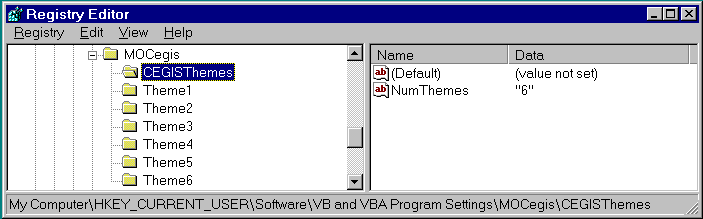
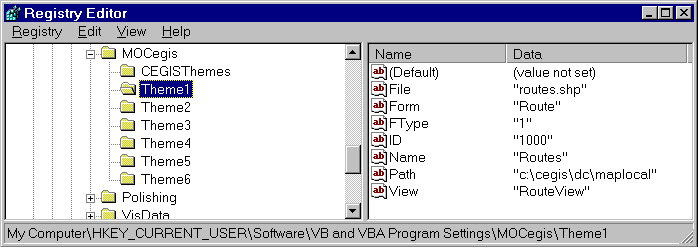
The information in the registry can be changed with the registry editor, but this is too complicated for most users. We have a module which will provide a user friendly interface for modifying these settings.
Another reason the map layer class needed to be extended was to handle the connection to the database. Certain layers, as specified in the registry settings, are linked to database data. The features in these layers are given unique ID values which serve as indexes into the database. That data includes attributes and file attachments. To access the database from the VB application, we could have utilized the data access tools that are provided with VB with the Notes ODBC driver. However, the database we need to access is a Lotus Notes database, so we used a tool, VB Link, that is specifically designed to access Notes. VBLink is a custom control that uses the Notes API. It is optimized for the way that Notes stores data so it provides faster access.
We had to extend the layer class so that it contained information about which database to use and what data from the database to link with. When data is retrieved for a feature in the GIS, an interface that we developed allows the user to view and edit the data that resides in the database corresponding with that map feature. When a new feature is added to map from one of the database linked themes a blank entry is created in the database. Another goal of the database linkage use the data to populate the table portion of the shapefile. When the table is populated, it can be used to create legends and search for features on the map.
While ArcView provided a good GIS solution for our customers, we found that we could offer a more specifically tailored application by using MapObjects with VB. MapObjects provides a significant library of objects and functionality for the developer, but extensions to these need to be made in order to develop a sophisticated application. In particular, we have found that it is useful to add additional properties and methods to the map layer objects so that they can be used in more complicated operations.
Once a complete layer object design has been created, it is possible to use this to save out project information and to create ArcView-like interface features such as the Table of Contents. While developers can quickly build a simple MapObjects viewer type of application, in order to provide features such as complex layer editing and legend customization you must extend the basic MapObjects classes.
Montlick, T., "What is Object-Oriented Software?", Software Design Consultants, 1995.
Lombard, K., ""Application Development with MapObjects and Visual Basic"", Proceedings of the Esri User Conference, 1997.
Matthew McKnight
Applications Programmer
TASC
12100 Sunset Hills Drive
Reston, VA. 20190
Telephone: (703)834-5000
Email: memcknight@tasc.com
Kristi Lombard
GIS Applications Programmer
TASC
12100 Sunset Hills Drive
Reston, VA. 20190
Telephone: (703)834-5000
Email: klombard@tasc.com