Customer Service Toolkit: USDA Looks to the Future of Desktop GIS in a Mobile Computing Environment.
Steven L. Ekblad
, Toolkit Development Team Leader, USDA-NRCS, Fort Collins ColoradoEric J. Strand, Vice President, Synergetics, Fort Collins, Colorado
Jack C. Carlson, Acting Director, USDA – NRCS Technology Information Center, Fort Collins, Colorado
Abstract
The USDA Natural Resources Conservation Service (NRCS) is focusing on the future by developing and implementing desktop GIS for office and field use. NRCS mandated that future information technology solutions be based on third party vender software and not custom application development. Currently, a common computing environment has been developed for NRCS, Farm Service Agency, and Rural Development. The Customer Service Toolkit is a Business Process Reengineering (BPR) project within the USDA Field Service Center initiative that will deliver new tools for common computing environment users.
The Customer Service Toolkit software integration project is defining a software architecture that supports desktop GIS integrated with Microsoft® Outlook®, Microsoft Office 97®, and Microsoft BackOffice® products. Toolkit is designed to allow USDA employees to access and share customer specific tabular, spatial, word processing, and spread sheet documents in a field office service center. The software architecture facilitates and tests emergent strategies dealing with mobile disconnected computing. Design and implementation issues include laptop data storage, data sharing, long transactions, digital orthophotography compression, gateway data distribution, and other emergent mobile computing problems.
Introduction
USDA field service center agencies are the Natural Resources Conservation Service (NRCS), Farm Service Agency (FSA), and Rural Development (RD). The USDA field service center agencies have undergone major office consolidation and staff reductions over the last five years to achieve established goals for improved efficiency and cost reduction while sustaining effective program delivery. Office consolidation has reduced the agency presence from offices in every county to approximately 2500 offices nationwide. Continued decreases in staffing levels are occurring while demand increases for natural resource inventory, conservation planning, rural development, farm programs, and technical assistance.
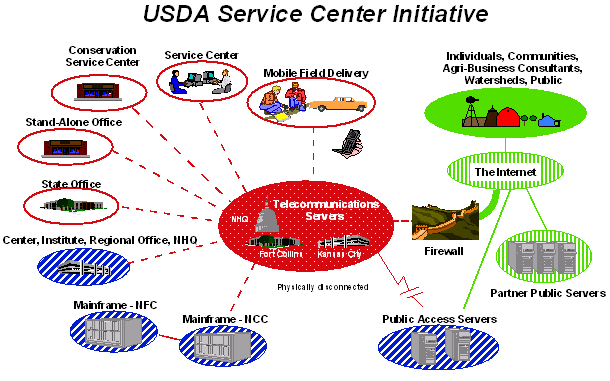
The Service Center Initiative (Figure 1) is USDA's response to meet this need for improved customer assistance by providing a "one stop shopping" approach to servicing USDA customers. This initiative chartered the three USDA agencies with evaluating the way business is conducted and customer service provided through business process re-engineering (BPR). Nine USDA Service Centers across the nation have been designated as pilot sites to test the new information technology tools and refine business process workflows.
Figure 1.
USDA Service Center Initiative information technology vision.Business Process Reengineering is a fundamental rethinking and redesign of business processes to achieve dramatic improvements in cost, quality, and timeliness of providing customer service. Service center agencies engage in land-based activities such as farm programs, rural development, and natural resource conservation assistance. Customer information will be acquired, maintained, and shared by all field service center agencies. The Customer Service Toolkit (CST) is a service center BPR project directed at servicing USDA customers in resource management and program delivery using new technologies for mobile computing and desktop GIS.
The keystone to implementing the Service Center Initiative is to deploy a common computing environment to the field office service centers. The three agencies are charged to analyze, select, and implement a common computing environment to replace dated legacy systems. The BPR projects develop operational prototype software with capabilities to address business workflow requirements. These information technologies enable and facilitate business process re-engineering.
Mobile Computing and Desktop GIS Objectives
Improved Products and Services
Laptop computers, personal digital assistants, and GPS units are the type of mobile computing tools that provide field service center personnel access to resource data, technical standards and specifications, program information, and customer information. Portable printers capable of reproducing maps, graphics, and digital orthophotography enable field personnel to deliver high quality products to customers on-site.
Desktop GIS and personal productivity software allows creation of custom tailored resource inventories, assessments, maps, and conservation plans for each customer. These high quality information products include georeferenced resource assessment and conservation plans; interpreted soils information delivered in electronic format for use in precision farming; digital orthophotography-based, color thematic maps for identifying resource concerns; GPS located engineering practice diagrams and digital imagery; and assessment and location of wetlands or other fragile natural resources.
Resource conservation is accomplished through natural resource inventories, analysis, and planning. Mobile computing allows flexibility for where this work is accomplished. The mobile computing environment enables field conservationists and conservation partners to work remotely and with greater flexibility. Technical assistance and information products can be delivered to the customer at their location instead of at an agency's office. With improved technologies in computers and telecommunication, more individuals will be able to work on-the-road, from their homes, and at the customer's location. These Service Center staff members will not be confined to an office-centric, stationary, working environment. They will be exploiting this dynamic, flexible, working environment to provide timely, efficient, and responsive program delivery to the public.
Geospatial Workflow Support
The Toolkit project is adapting GIS to support the decision-making workflow at pilot sites: the project is not implementing GIS to provide decision support tools. What does it mean to implement desktop GIS into actual business process workflows? Workflow support means that the user can select the right set of tools and focus on solving new and changing business problems. By effectively implementing geospatial tools to support the decision making workflow, the decision-maker has fast access to better information that enables them to do their job more efficiently and effectively. These tools quickly gain user acceptance since they do not try to augment or substitute professional judgement with automated decision support or expert systems technology.
A major culture shift for Service Center workflow is to use the geospatial land-based metaphor instead of the paper-based accounting metaphor for providing customer assistance. By using desktop GIS tools, the Service Center will gain efficiencies by providing customer assistance in the context of the customer's actual land location as opposed to the abstraction of a text based information system. This increases the confidence and credibility in communicating with the customer to provide natural resource, land management, and other assistance related to location. The geographic focus is a common point of integration for customer information and facilitates the assimilation of legacy information system data.
The Service Center Initiative is providing new geospatial data and tools to the Service Center offices. The USDA Service Center Initiative implemented processes to acquire and distribute one-meter digital orthophoto base maps and nineteen geospatial themes. The BPR pilot projects are evaluating GPS units, mobile computing, personnel digital assistants, and digital cameras for integration into workflows that need spatial components.
BPR projects require reduction of duplication by analyzing, converging, and integrating business processes between Service Center agencies. This allows the opportunity for integrating geospatial technology into the business workflow. The technical challenge is to determine the best fit between the available GIS technologies and the work tasks performed frequently. Experience from the pilot sites demonstrates that - when properly implemented in the workflow - some of the least technologically sophisticated GIS tools provide the greatest level of efficiency for the Service Center user.
A prime example is the simple calculation of acreage for arbitrary shapes drawn over a digital orthophotograph. The user should be able to calculate an acreage faster with the tool than they can by using a planimeter or counting the dots on a dot grid. Acreage calculation is used so frequently in many of the work processes that it must be easily accessed to use efficiently. Calculating acreage is fundamental to continuing with other work tasks, yet it was overlooked in the out-of-the box desktop GIS. Rather than focus energies on automating the decision support processes that can be done after calculating acreages, the team implemented a simple acreage calculation tool that fit the user's workflow to support business process objectives. Implementing a collection of these "best-fitting" tools ensures that the technology serves the user, instead of the user serving the technology.
Common Computing Environment
USDA-NRCS Future Directions (USDA-NRCS 1997) and the USDA Common Computing Environment (USDA 1998) standards encourage the use of Commercial-Off-The-Shelf (COTS) software solutions. In all cases, during Toolkit prototype development, commercial products were evaluated to solve and address business requirements first before considering developing in-house code. Functionality provided by Office 97 / Outlook 98 personal productivity suite was fully explored to utilize existing interfaces versus creating stand-alone programs. Esri ArcView® was used for pilot site desktop GIS development and implementation. BackOffice is implemented on the server to enable the use of Microsoft Exchange Server® and Microsoft SQL Server®.
The USDA Common Computing Environment deployed Windows NT® 4.0 workstations and servers to Service Center offices. The computers currently used at the nine pilot sites are Dell 400 MHz / Pentium II desktops, Dell Latitude 266 MHz laptops, and 333 Dell MHz Pentium II (single processor-dual processor capable) servers. The local area network is a 10 base-T network with 10 Mbps communication cards. The wide area network is connected with 56 Kbps frame relay.
Development Approach
The critical requirement for implementing information technology solutions is to support workflow with best-fitting tools. For sequential or repetitive alphanumeric data entry tasks, the design would have kept the traditional forms-based approach using keyboard and data entry screens. Similarly, for repetitive map data entry processes, the team would have designed the application software to keep control of the user interface to efficiently process the work steps performed by the user. For user event-driven processes, the team took careful measures to develop non-intrusive interface components that seamlessly integrate with Microsoft Office, Esri ArcView and other third party personal productivity tools.
By building the Toolkit consistent with Microsoft’s user interface, users can apply what they learned from application to application. The user benefits by not needing to learn multiple custom applications with non-industry standard interfaces. Nor do they require specialized training and voluminous documentation. Users can find innovative ways to combine applications and tools to solve workflow problems as they arise. The flexibility provided by a consistent set of tools empowers the user to create adaptive solutions to changing and unforeseen business needs.
The Toolkit Development Team followed the "buy before build" solution development model. Toolkit integrates component software from Microsoft Visual Studio®, Office 97 / Outlook 98, Visual Basic Sourcebook, Desaware, Sheridan, and other third party component software vendors. Figure 2 depicts the use of a third party calendar component used to consistently enter dates for conservation practices. This is one part of the user interface dialog for the Practice Schedule tool implemented in Visual Basic and dependent on land unit data passed from ArcView.
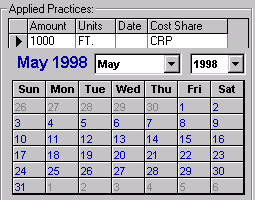
Figure 2.
Calendar control within Practice Scheduler dialog.The Toolkit Development Team develops solutions more by acquiring, integrating, and assembling software components than by writing in-house code. The requirements to interface component parts into an effective solution determine which software components to write and the programming language to use. Consistent with this approach is empowering end users to customize, augment, and extend these commercial and developed tools to satisfy requirements that cannot be foreseen in the prototype development environment.
The Toolkit brings together several applications on the user's desktop. The Toolkit Development Team used the Visual Studio 6.0 development environment to implement a solution that incorporated Esri ArcView and Microsoft Outlook, with custom developed applications built with Avenue® scripting and Visual Basic. These applications comprise the Toolkit tools that can utilize heterogeneous data stores under a consistent user interface.
The Toolkit's tight integration with the Outlook object model realized the benefits of industry standards for Microsoft Office products and Outlook customer business support. Outlook customer contact data is immediately available for use. Examples of synergistic benefits are: synchronizing Rolodex with a Personnel Digital Assistant (PDA); creating a street map from the customer's address over the Internet (http://www.expediamaps.com/); journalizing assistance notes; and generating customer mailing lists. Future versions of Toolkit will have spatial selection criteria for email and other categorized mailings.
The Microsoft BackOffice product suite affords the necessary application and data servers to provide enterprise data to the user workstations. For example, a Toolkit tool transfers essential customer data from enterprise relational databases to the workstation's Outlook Rolodex, implemented as a shared Exchange Server public folder. There was also the need to facilitate access and management of multiple types of data stores: relational data, office documents, journal items, spatial data files, and image data. The team extended the Outlook customer contact form to provide a file explorer to display customer specific ArcView projects, Office documents, digital photos, and other files.
Customer Service Toolkit v1.1
The capability to check out and check in customer folders is a key need for managing customer related files and relational database records. The team implemented check out / check in (Figure 3) to support the transfer of spatial data, images, and office document files. The team implemented relational database synchronization for customer records transferred between the user's workstation and the BackOffice SQL 6.5 database server.
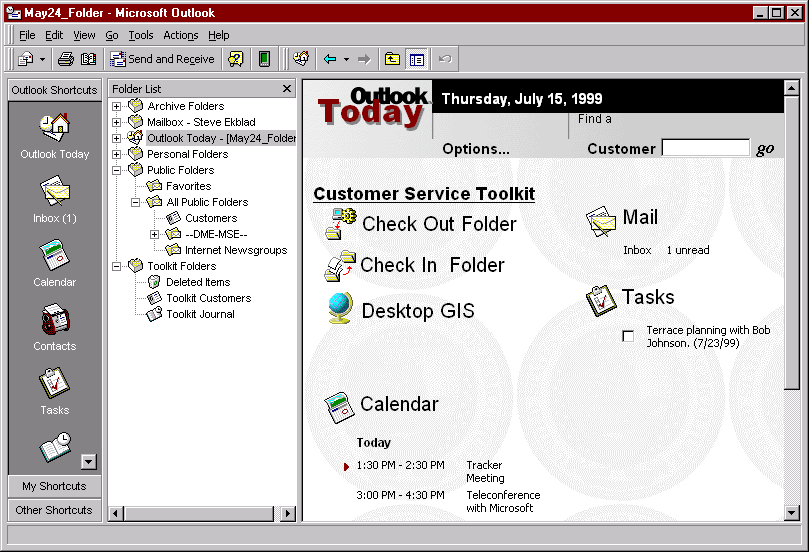
Figure 3.
Microsoft Outlook Today customized for Customer Service Toolkit check out / check in capabilities.By locking out more than one user, the customer data was safeguarded from mixed data entry that creates data reconciliation problems. This enables taking the customer folders to the field with a portable computer to provide on-site assistance. The Service Center users could see who had the customer data file checked. This simple "all or none" access control serves the first level of need, but there are additional needs to share access to copies of certain data files.
The Toolkit Toolbar (Figure 4) is a collection of tools that were built using ArcView Dialog Designer and Avenue or Visual Basic controls. These applications were grouped into two categories according to their specific use: Tools and Attributes. "Tools" provide general capabilities to work with active themes in a view. "Attributes" provide capabilities specifically for creating and managing standard data themes for use in Service Center applications.

Figure 4.
The Customer Service Toolkit Toolbar extends the "out of the box" capabilities of ArcView.Tools
Attributes
The Dialog Designer dialogs receive user input and launch Avenue scripts. The team resorted to Visual Basic to develop the conservation Practice Scheduling tool due to the user interface complexity and the requirement to read and write relational data implemented in Microsoft Access®. ArcView provides the means to join Access tables to shapefile tables for reading, but not for inserting or revising data values in the Access tables.
To support the workflow process, we reviewed the Esri desktop GIS to identify fundamental capabilities that are not supported out of the box. The replacement of the planimeter for area calculations for natural resource planning is a frequently used tool that the Toolkit team added. For example, determining acreage for a range site in poor condition involves identifying areas with a grease pencil on an aerial photo print and calculating the acreage. The Toolkit tool enables the planner to create these arbitrary geometries against a digital orthophoto and quickly calculate the area as acreage.
During the pilot prototyping process the Toolkit team took special measures to obtain feedback from the Service Center users on what works for them and what doesn’t work for them. This entailed conducting briefings, demonstrations, training sessions, and publishing use cases on the web for review and comment by pilot site users. Specific attention was focused on eliciting requirements due to repetitive business workflow that were not supported by out-of-the-box tools in ArcView. Conversely, the Geoprocessing Wizard is an example of Esri augmenting the available ArcView tools that resulted in the Toolkit team removing the Clip and Intersect tools developed for the Toolkit Toolbar.
Toolkit Express 2.0
To facilitate deployment to sites that do not have a BackOffice database server, the next generation of Toolkit was implemented by augmenting shapefiles with an Access database for each thematic shapefile set. This revised architectural design enables the use of document management systems to perform check out /check in with finer granularity. This design also overcomes the problems encountered in maintaining a central database for customer attribute data that can be replicated from the local area network server to each of the disconnected laptop computers. The team extended the shapefile concept for land unit themes to include an Access database to support one-to-many data relationships with read/write access. By making the data store more flexible as a loosely-coupled, file-based implementation, the team sacrificed centralized database management capabilities provided by the SQL Server database - such as queries and reports against the aggregated customer database. Future work is planned to develop the facility to aggregate individual customer themes into countywide thematic geospatial data sets. This facility will likely be implemented using Spatial Data Engine (SDE) technology.
Integrating tools developed in Visual Basic posed serious problems with tools built using Avenue scripting language and dialog designer in ArcView. In the Windows environment, the VB-developed tools are separate applications from ArcView. According to Burt Harris (Microsoft 1999), Microsoft internal studies indicate that the majority of work activity is centered on the communication and management of information from the user’s desktop. Microsoft Outlook 98 focuses this perspective for email, contact, task, and journal items as well as office documents and files. The team extended the Outlook customer contact form (Figure 5) to provide a file explorer for displaying ArcView projects and other files. These capabilities facilitate the access and management of every type of data store: relational data, office documents, journal items, spatial data files, and image data.
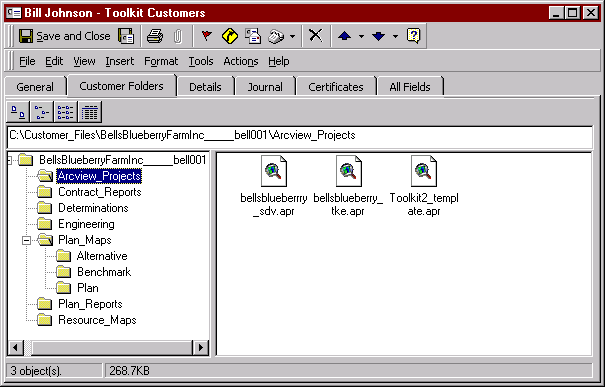
Figure 5
. Microsoft Outlook Contact form customized for USDA Service Center customers.To make these tools work together seamlessly required the Toolkit team to implement state control and interprocess communication between the applications. By reducing the dependence on Avenue implementation, the team gained greater flexibility and control of the "look and feel" for the user interface and increased the development time efficiencies by an order of magnitude. The Toolkit team implemented several polling and event driven mechanisms that passed state information through the Windows registry to ensure consistent and synchronous operation of the VB tools and the ArcView application. For example, Figure 6 illustrates the enhanced capability that allows the user to click on the toolbar during a work session and obtain the current information identifying the active theme and view within the selected customer's ArcView project.
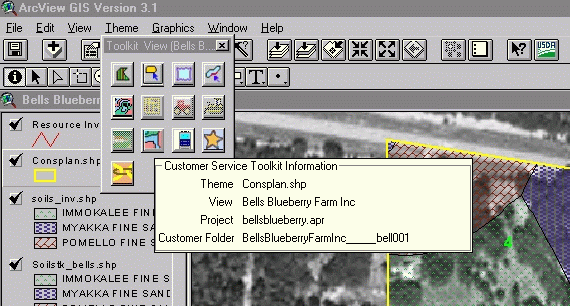
Figure 6
. Visual Basic 6.0 provided greater flexibility to implement the Toolkit Express toolbar.After using Toolkit version 1.0, the users expressed their dislike for a toolbar that could only be positioned in the active view. The VB-based approach allowed the user to resize the toolbar as needed and relocate it to any desktop location. The VB approach also allowed for more consistent Windows style context sensitive help.
Toolkit Express 2.0 is designed and implemented to support legacy data and processes. A legacy data utility provides migration of conservation planning and contract information from a relation database application in UNIX to Microsoft Access database and Excel® worksheets in Windows NT. New conservation plans and contracts can be built through the use of a wizard that provides seamless development of a conservation plan or contract, implemented in an Excel spreadsheet. The Toolkit team also provides a conservation symbology palette that allows the user to develop map products with traditional natural resource planning symbols.
The Toolkit is designed to be a metaphor that can be implemented in essentially the same way for numerous business problems. By maintaining a toolbar approach and consistent look and feel, numerous natural resources and program driven business problems can be address with little new training for the users. An example of this approach is the Wetland Determination Toolkit which was developed as a pilot for USDA - NRCS. The Wetland Determination Toolkit uses the same concept of a Toolbar that calls either tools or attribution dialogs.
Soil Data Viewer
Soil data and soil data interpretations are critical for resource planning. The Soil Data Viewer tool (Figure 7) is the first breakthrough tool that takes attribute data from legacy soil inventories and enables agency users to prepare custom soils maps for individual client needs. This enabling technology truly provides an information rich product from previously collected agency soils inventory data, based on soils scientist business rules for interpreting soil data for specific applications.
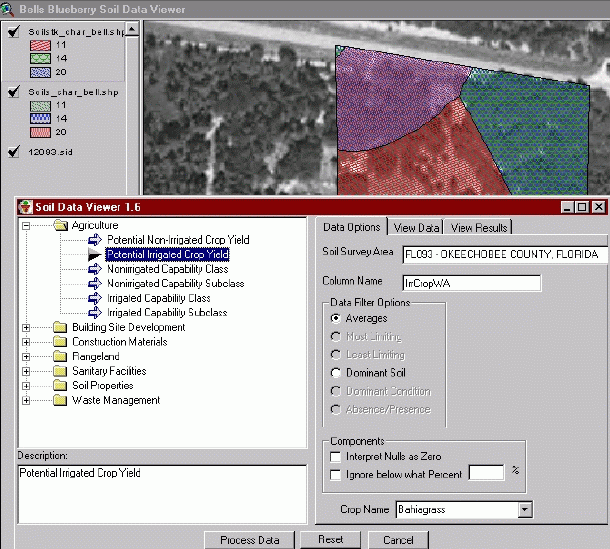
Figure 7
. The Soil Data Viewer tool generates map themes of soil data interpretations.Rather than use over-simplified "most likely" interpretations, the user can identify the spatial area of interest and select which criteria will be used to produce a soil interpretation from the constituent soil component data values. The conservationist uses the Soil Data Viewer to prepare soil interpretation themes during the resource analysis and planning activities with a customer. These themes can be saved as shapefiles, printed in conservation map layouts, and saved along with other resource themes in the customer's folder. This is really a business process reengineering tool. It eliminates the practice of giving the customer the entire published soil survey area documents and maps. Instead, the customer is given a tailored information product containing specific soil data interpreted for specific natural resource planning needs within the customer's location of interest.
The Soil Data Viewer component software architecture facilitates code reuse as demonstrated by the development of the USDA prototype Web-based Soil Data Viewer (Figure 8). This prototype Internet application is targeted for use by the public to obtain soil interpretation data and maps on demand. The prototype intranet application is targeted for use by the Service Center field personnel.
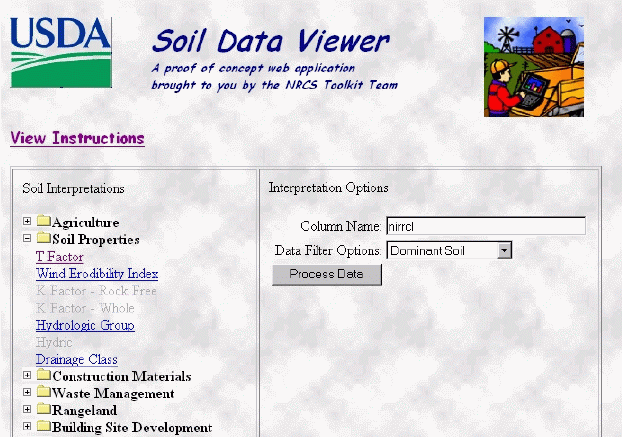
Figure 8
. The Web-based Soil Data Viewer prototype is being developed for Internet and intranet access.The design of the Customer Service Toolkit encompasses connectivity to the available information sources on the Internet, including USDA developed intranet sites. Future implementation will include tools to identify and request geospatial datasets from data warehouses. The Service Center Initiative is developing a natural resource data gateway to facilitate the location and distribution of spatial and non-spatial natural resource data in formats compatible for consumption by the Customer Service Toolkit or other applications. This level of geospatial data accessibility will be vital to the successful use of GIS technology in each of the 2500 field Service Center offices.
Summary
The USDA Service Center initiative is beginning to pay off by using new and improved information technologies. Business Process Reengineering with mobile computing and desktop GIS has allowed new technologies to focus on existing Service Center business processes to improve customer service. The initial pilot site activities are enabling users to gain "hands-on" experience by test driving these tools with real life customer information integrating land-based locational data with traditional descriptive customer data. Service Center users are able to conveniently work across traditionally specialized applications that formerly depended on GIS specialists or trained technicians. They are empowered to use all forms of customer related information (spatial and nonspatial) to produce useful information products that serve the needs of their customers whether in the office or at the customer's site.
References
USDA-NRCS August 1997 Future Directions: A Vision of Information Technology for Field Conservationists
USDA 1998 Common Computing Environment (http://www.usda.gov/servicecenter/cce/)
Harris, Burt 1999 Microsoft Senior Consultant personal communication.
Trademark Information
Microsoft, Access, Back Office, Exchange Server, Excel, Office 97, Outlook, SQL Server, Visual Studio, and Windows NT are either registered trademarks or trademarks of Microsoft Corporation in the U.S.A. and/or other countries.
ArcView, Spatial Data Engine and Avenue are either registered trademarks or trademarks of Environmental Systems Research Institute, Inc. in the U.S.A. and/or other countries.
Biographies
Steven Ekblad is the Development Team Leader for the USDA Service Center Initiative, Mobile Computing and Desktop GIS, Business Process Re-engineering project. Steve is a graduate from Texas A&M University with BS and MS degree specializing in natural resource information systems development and implementation. For the last 10 years he has managed software development projects for USDA – NRCS, Information Technology Center, Fort Collins Colorado.
http://www.itc.nrcs.usda.gov/toolkit/
Eric Strand is Vice President of Synergetics Incorporated and is the contractor project manager for the Customer Service Toolkit project team. For the last 20 years he has led information technology development projects emphasizing GIS for federal government and private industry applications. He is contributing editor to GEOWORLD magazine.
Jack Carlson is Acting Director of the USDA NRCS Information Technology Center, Fort Collins, Colorado. In the past eight years, he has led the development of information systems for agency field conservationists. He holds degrees in agronomy and plant biosystematics and genetics.