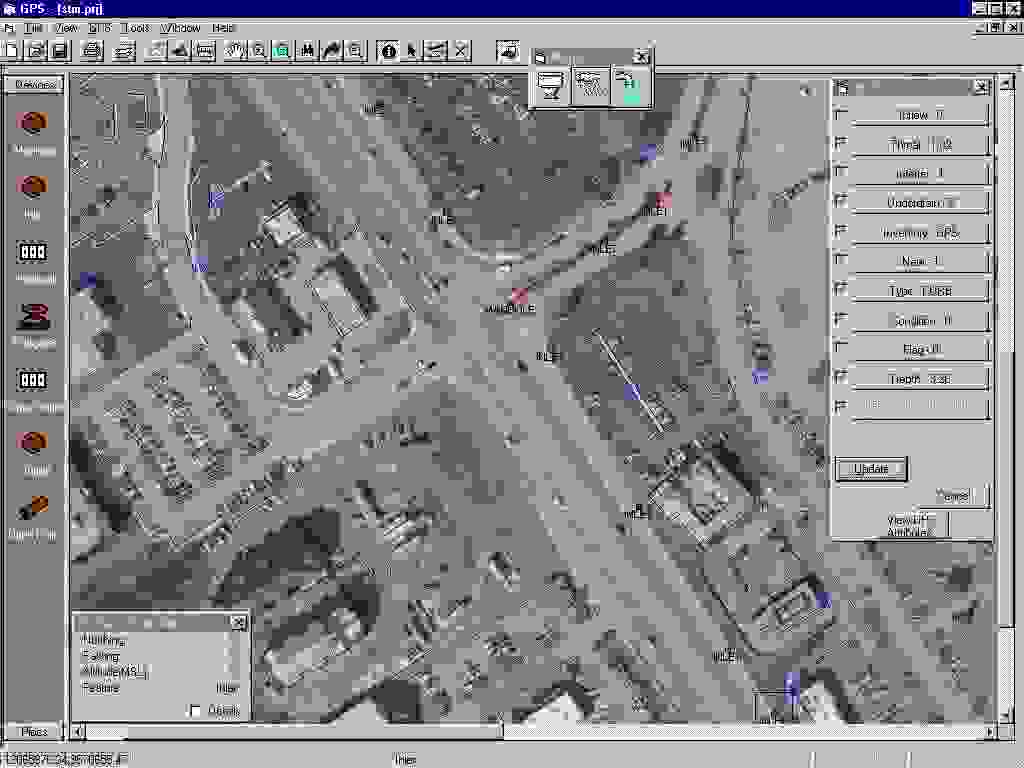
An Esri MapObjects application was integrated with Trimble GPS Pathfinder Pro Xr/XRS software to provide a GIS-based field data collection and mapping solution for a large utility mapping project in Savannah, Georgia. This application has allowed surveying and facilities maintenance staff to collect engineering data, and map connectivity of multiple utility systems simultaneously in Esri shapefile format. This tool is linked to GPS technology to provide precise utility locations on top of existing GIS data, as well as providing staff with real-time analysis of utility data such as material, diameter, and invert depths at upstream and downstream manhole locations.
SMARTSurveyor is a mobile mapping system created by Woolpert that enables GPS crews to map water, sewer, storm, water, and electric utility systems and structure attributes on the fly, with complete network connectivity, in a single sweep. This application provides access to data output from Trimble GPS receivers to update and create GIS data that contains position information. GPS data can be saved to a recorder file for future checking, and GIS data contains position information that's stored in Esri shapefiles.
The technology that is used in SMARTSurveyor integrates GPS capabilities into a GIS system that that crews can establish network connectivity while they're still in the field performing the data collection.
For government officials who are Woolpert clients, the notion of a building an inventory doesn't simply mean collecting a structure location and then walking on to find the next structure. The idea is to pop the manhole open to get information on the structure itself, including its connectivity. This means that the network is constructed as the information is collected. Local government entities have a strong financial incentive to precisely locate and inventory their structures and know how they're connected. The value of their systems is based on the number of structures they have and knowing which ones are adequately performing and which ones are costing the local government time and dollars. Local government entities are asking themselves "Do we know how many structures within our utility? Do we know which ones are functioning correctly--is a pipe leaking and are we losing billable water consumption?"
Past inventory processes just observed the structures and their locations, using source documents as a guide, and a second inventory sweep. This told crews where hydrants, valves, manholes, and so forth were located, but it didn't build the connectivity that an inventory needs. Source documents aren't always accurate and connectivity wasn't always shown. Many times, source documents just can't be trusted. Still, a GIS was built using GPS locations and source documents, and no one was sure how it was all connected.
SMARTSurveyor takes the next step. Real time mapping and system construction happens in a single sweep. Utility systems are mapped during the inventory collection process. Crews can now pop open a manhole and record the information that's associated with a it--location, condition, and connectivity. Using hand held devices, crews locate structures and record associated feature attributes on the spot. Connectivity is built for utility systems with pentop computers using attribute forms and domain pick lists. Attribute forms record the data about attributes, and domain pick lists define the attributes for the different structure types. These two features, attribute forms and domain pick lists, are built-in quality control methods. They reduce attribution errors.
SMARTSurveyor paves the way for a holistic approach to building the GIS. Building while in the field has never been done before. Previously, several crews, with no continuity between crews and collection procedures, were needed to build a project. Now, we have an accurate, reliable, and complete method of building a GIS, and municipalities are realizing the the up-front investment that is needed to collect the data.
Municipalities can truly integrate GPS capabilities into a GIS. While data previously could come from a number of sources, including as-built drawings, the data didn't always provide the level of accuracy needed for a reliable GIS. SMARTSurveyor enables crews to locate field features with GPS that provides two types of data: location and attribute. Now, not only can crews document the location of a device or a structure, they can build network connectivity in the field. An accurate inventory is built in the field in a single sweep using GPS and accurate inventorying attribution.
The process of building an accurate, reliable utility inventory requires thorough planning and an interactive approach to solve real-world problems. SMARTSurveyor alone can't produce all of the benefits of a utility inventory. The consultant and the government officials need to "partner" together so that the municipality can realize the benefits of a true GIS that is built in the field. An innovative approach is to involve the government officials and perform a "test drive" of the data collection process.
A test drive is not a pilot project. A pilot project is usually completed by the GPS/GIS contractor, with results reported later to local government officials--long after budgets and schedules have been set. Instead, a test drive is the city and county officials spending a day or more in the field walking the streets and hunting down utility structures alongside the GPS crew before the scope if finalized. While clients agree there is much benefit to an accurate GIS, they often have varying opinions on what information to collect and what the information means to them. When many people come together on projects with a large scope, there naturally are a number of ideas about what data is needed. And, it is yet another thing for each person involved in the decision-making process to see and know what it takes to collect this data.
While a valve may be clearly outlined on a source document, debris or sediment can keep it hidden unless the street is swept. Participants watch as a crew uses metal detectors, shovels, and picks to find the hidden structures. Often times, structures that are not even located on a source document or were inaccurately recorded on a source document are located. If these structures can be found, additional value is added to the inventory--one more capital inventory item is added to the municpality's financial resources. Other structures, although they're clearly marked on existing maps, sometimes can't be found. Analysts and technicians would question the validity of the source documents, yet previous to using SMARTSurveyor technology combined with a test drive, network connectivity was built using these questionable source documents.
A test drive shows the government officials how it all comes together, tests the project theory before full-scale execution, and immediately shows benefit. By using real-time information, it shows how a GIS can be dynamically built in the field using SMARTSurveyor technology to integrate GPS capabilities into the GIS system and the need for project-specific field procedures. It dramatically improves the chances of success for the GIS.

A test drive performs two significant functions:
Additionally, the test drive approach answers the questions that nearly all government officials pose to define their project. The answers to their questions define the ultimate accuracy and detail needed for the GIS. These questions include:
Unexpected problems are found during the test drive. These problems can include buried manholes and hidden valves. Solutions to previously unknown problems can be found before the full project is executed. And, taking the test drive approach one step further, it produces the work procedures needed to accomplish the inventory. Workflow is defined through a field procedures manual. A field procedures manual can be written and implemented because 90% of the procedures are worked out and learned during the test drive--before the actual project is attempted.
The test drive is an important planning tool because hidden issues can be addressed before the time and money are spent for the GIS. Officials who participate in the test drive see that the GPS utility inventory is more than simply collecting points. Woolpert recently participated in a project where we learned that RTK GPS wasn't feasible. The test drive clearly demonstrated why. The area's dense tree canopy made only 35 percent of the structures GPS-observable with RTK. To obtain the needed three to five centimeter accuracies on these structures, a second sweep with a total station would have been necessary. A second seep would have made the RTK GPS too inefficient and costly to adopt.
Although RTK GPS couldn't be adopted for this project, there was an immediate benefit: the project scope was refined before losses were realized for both the client and for Woolpert. Issues were resolved before they became problems in the field. Two main issues were:
The test drive provided the catalyst for a group of team members, each with a different background, to resolve these problems. It was decided to flag points that weren't GPS-observable in one of three ways: "Obscured," "Inaccessible," or "Not Found." Municipal crews would return later to the field to accurately locate all "Not Found" features.
The general condition ratings condundrum was resolved by agreeing that structures that were found to be function would be flagged "acceptable." Structures that were found to be non-functioning would be flagged as "unacceptable." This would let the municipality quickly identify any structures needing repairs.
The test drive determines the amount of effort that's required to perform the data collection in the field. This in turn can lead to more reliable schedules, and provide flexibility. Because the amount of effort needed to collect the data is realized up front by government officials, weekly meetings are necessary for the actual project execution. Collected data is brought into the office and is immediately ready for use, and crews can provide statistical reports of what has been collected in the field. Maps of the data that was occupied and built are provided. Armed with this information on a regular basis, there is room for improving and refining the process on an as-needed basis. Expectations are communicated clearly across the project team and significant goals are set and attained.
The test drive is important for a fundamental reason: to establish and refine the procedures needed to gather inventory data. This in turn helps in defining the scope of the project. While technology is extremely valuable to the collection process and SMARTSurveyor enables crews to record all the data in a single sweep, the data itself could be virtually worthless unless procedures are built and written for the crew to follow. Crews rely on objective criteria for data collection and attribution. By defining the procedures, you have a good base for estimating the manhours that are needed to perform the entire project, and scopes are then much more accurately written.
A field procedures manual helps to solve errors of interpretation. For example, what one municipality called a "B box," Woolpert called a "service valve." It's easy to see how quickly data can become nearly worthless if differing terms are used to describe the information. To bridge the language gap, photos of each structure type should be taken and reproduced in the manual with appropriate labels so that database references are familiar to local government users. Taken a step further, attribution must also be defined. Crews need to be able to quickly pick from a list of pre-defined attributes that are associated with a structure to enforce consistent and reliable data standards. SMARTSurveyor technology provides the ability for project teams to tightly define data terminology and attribution and incorporate this information in the project's pick lists and attribution lists. When data is input, the crew has no hesitation in entering the data and applying attribution. The chance for errors and inaccurate data is clearly lessened.
Field procedures, however, go beyond data entry standards. Sound field procedures should include everything--from how to record the data in the field, to the uniforms the crews will wear, to explaining the level of effort required in obtaining the data--that is needed to complete the collection process. And, it should stand as a training document for new crew members. Every project member, including project managers, government officials, and crew members, know what is expected. There is a set of objective standards. A well-written field procedures manual is Woolpert's bible. It will help the municipality to maintain and update it's utility data in the future because how the data is captured and recorded is directly tied to its usefulness and quality.
Creating a field procedures manual causes project managers and the local government officials to think very carefully about the entire process. It helps to identify issues that many times aren't thought of until a project is in full execution. These issues cover a variety of problems, such as how to attach attributes on the fly and in the field to pipes that haven't been mapped yet.
The practical benefits of a field procedures manual have an immediate impact. While working with a municipality to produce its field manual, a municipality noted that underdrains should be captured but laterals should not; and that only the presence of a valve, not its precise location on a hydrant should be noted. If Woolpert's project manager and the client hadn't gone through this exercise, crews may have spent time obtaining positional information that wasn't really needed. A mantra has evolved in our field collection processes. Whenever there's a question in one of our meetings, users will say, "What does the field procedures manual say?"
The process Woolpert uses is demonstrated in the diagram below.

The planning process that is required when using SMARTSurveyor with test drive techniques is a true investment in the GIS. It requires thorough planning and takes an interactive approach to solve real-world problems. By conducting the field inventory using the SMARTSurveyor GPS technology and strong field procedures, the GIS provides the most accurate location data for all other GIS-related activities. This in turn helps utility planners prepare for future growth.
The benefits of these techniques are wide-spread, and affect the financial concerns of a municipality, its planning abilities, and its disaster management abilities. Many local governments do not know the extent of their utility inventories--they are often underestimated. Because of inaccurate inventories, funding for improvements may not be adequate. Using GPS technologies with a well-planned project can decrease the time it takes to accurately inventory structures from many years to just two years or less. Because budgets are based on the structures themselves, municipalities are strongly motivated to find better ways of inventorying and managing their infrastructure.
Woolpert was hired by the Savannah Georgia area GIS consortium to perform a GPS inventory of it's water, sewer, and stormwater utilities. The city is one of the south's oldest. Much of its infrastructure was aging, possibly hidden, and possibly either missing on the source documentation or inaccurately documented. Woolpert proceeded to prove to the city a benefit that our competition wasn't able to provide.
A test drive of the city's water and sewer utility was performed over a two to three block area of the city for a day. All team members participated--both from Woolpert and the city. Work that the GPS crews performed was witnessed, and all team members reviewed the source documents while the work was being done. Almost immediately, problematic situations were encountered. A source document stated that a storm sewer existed at one position, but the field investigation proved that there actually was no a storm sewer. However, a short distance away, a storm main existed in the middle of the road. That main was not a part of the source documents.
As the test drive proceeded, buried manholes were discovered. Manholes were buried over time due to development when lots were graded. Metal detectors were brought in to locate the manhole. However, this presented another issue: should the city occupy the discovered manholes? On the spot, the team was able to determine that manholes that were discovered to be buried should not be occupied, but they would wait until the problem was fixed since the invert information would no longer be accurate if they were to occupy it during the inventory.
Over the course of the day, many issues like these were interactively solved to provide the city with the most accurate location information possible. Network connectivity was created and observed by the project team as the day proceeded. City officials were able to see immediate benefits with the data, and were able to determine the necessary field procedures to accurately scope the project. It was estimated before the project that the city had 48,000 structures, and that it could theoretically take three and a half years to locate and inventory all of these structures. Applying SMARTSurveyor technology with smart project planning will provide the city with an accurate, reliable inventory in two years.
Throughout the project, the philosophy is to take a hands-on approach. A high-tech methodology is embraced with sound procedures and communication. Planning is instrumental, but then take action. Revise as necessary in a deliberate manner. Small steps keep the Savannah project moving in the right direction.
Jim Moening, Project Manager Woolpert LLP 409 East Monument Avenue Dayton, Ohio 45402 Phone: 937.461.5661 Fax: 937.461.0743 E-mail: jim.moening@woolpert.com