
SimSITE: A GIS-Based Environmental Sampling Design Training Tool
Abstract:The Simulated Site Investigation Training Environment (SimSITE) is an Avenue-based tool used to teach hazardous waste site managers about quality assurance planning and assessment principles and techniques, such as the Data Quality Objectives (DQO) planning process and Data Quality Assessment (DQA). Users employ these concepts in designing a sampling strategy in a real-world-based simulation program. The SimSITE program provides sampling design tools to allow the user to develop multiple sampling strategies, determines the cost of collecting and analyzing those samples, and then simulates the collection and analysis of the samples. The program uses actual soil contamination data to return realistic analytical results. The user then uses built-in statistical tools to analyze their data and ultimately make decisions about cleanup activities based on their sampling results. The system then evaluates the accuracy of their decisions based on knowledge of the true contamination.
INTRODUCTION
Millions of dollars are spent each year conducting scientific investigations of property that is contaminated with chemical and radioactive materials. Environmental measurements of soil, air, and ground water are taken to determine where the contamination may pose a significant threat to human health and the environment. If a site is found to be contaminated, U.S. laws and regulations may require a site owner to undertake expensive cleanup measures. In addition, many local communities throughout the United States are voluntarily undertaking redevelopment of industrial "brownfield" sites that were contaminated through past activities. In both situations, the political and economic stakes can be high when risks to ecological and human health are balanced against the high costs of site investigation and cleanup. All of the stakeholders to these decisions have an interest in making sure that the information obtained from site investigations is credible and reliable.
The Quality Assurance Division of the U.S. Environmental Protection Agency (EPA) has been conducting research and development to provide practical methods and tools for planning and implementing site investigations and assessing the results, so that all stakeholders can be satisfied with the quality and defensibility of the site management decisions. As part of this effort, EPA has developed training to help government officials and their technical advisors learn how to apply a "quality systems approach" to site investigations. To support this training, the EPA Quality Assurance Division has sponsored the development of a computer-based training tool called the Simulated Site Interactive Training Environment (SimSITE). SimSITE is a Geographic Information System (GIS) application written primarily in the Avenue scripting language on the ArcView 3.0a/3.1 GIS software platform. SimSITE allows EPA training participants to apply quality management methods and tools through a simulation of the planning, implementation, and assessment phases of a contaminated site investigation.
SimSITE is proving to be a popular training tool. SimSITE’s simulation capabilities provide a way to explore site investigation techniques, such as statistical sampling, and see their consequences in a low-cost training environment. SimSITE has been used successfully to train over 300 people. The participant evaluations of training courses that use SimSITE have been the highest recorded by the EPA Quality Assurance Division. Training participants report that they are able to engage with the teaching points more readily when they can see the concepts illustrated graphically on the computer. As further evidence of SimSITE’s success, the software application itself won first place in the 1998 Avenue Programming Contest sponsored by the Environmental Systems Research Institute, Inc. (Esri).
This paper presents a brief overview of the software development environment used to produce and operate SimSITE. Next, the functional capabilities of SimSITE are described in the context of a typical sequence of user interactions to show how SimSITE is used in a training setting. Conclusions and directions for further development are presented.
DEVELOPMENT ENVIRONMENT FOR SimSITESimSITE is implemented in an IBM-compatible personal computer environment using Microsoft Windows and DOS programs. The main GIS system, ArcView 3.0a, provides the primary user interface and data management functions. Most of the user interactions and data processing functions are implemented using scripts written in Avenue. Some of the more complex input windows were developed using the Dialog Editor. A statistical error model, which adds sampling and measurement error to simulate the real process of environmental data collection, is written in C and implemented as a dynamic link library (DLL) call. Hypertext markup language is used to display background information about the contamination scenarios, which is displayed by calling the Netscape Navigator browser. Additional statistical tools are linked to SimSITE, including EPA's Decision Errors Feasibility Trials (DEFT) software (EPA QA/G-4D) and DataQUEST software (EPA QA/G-9D), and EllipGrid PC, a "hot spot" detection sampling design tool. Current system requirements for running SimSITE include an installed copy of ArcView 3.0a with the Dialog Editor, an IBM-compatible personal computer with a 100 MHz 486 processor (166 MHz Pentium or better recommended), at least 16 MB RAM (32 MB or more recommended), and at least 150 MB of available hard disk space.
FUNCTIONAL CAPABILITIES OF SimSITESimSITE was developed to provide a graphical way to explore different sampling and analysis strategies for a fictitious contaminated site. A "hidden" data layer of soil contamination is distributed over the site consistent with the background information about the contamination scenario. The training participants, working in teams, attempt to find the areas of the site that are contaminated at levels warranting cleanup. Each team is given a budget, and SimSITE tracks the simulated costs and time taken to conduct the investigation. SimSITE’s user interface allows for intuitive point-and-click operation, with menu-driven functions that help guide the user through the site investigation process. The underlying organization of information and tools follows a quality system framework, which emphasizes a life-cycle approach for planning, implementing, and assessing the environmental data operations for a site investigation. Figure 1 shows the startup screen of the SimSITE application, with menu choices and tool bars across the top, ArcView "themes" on the left, and a map of the "artificial site" on the right.
Please click on image to see full view...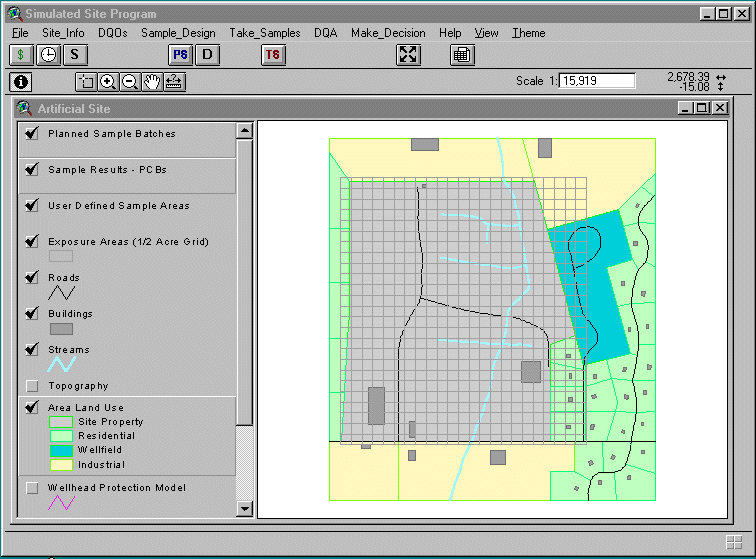
Figure 1. SimSITE's startup screen shows a map of the artificial site and tools for planning and implementing the site investigation.
BACKGROUND INFORMATIONThe user can choose to explore background information about the history and conditions at the artificial site by choosing the Site_Info menu selection. The user can read text describing the past industrial uses of the site and the contamination scenario, which involves the spraying of waste oil contaminated with PCBs onto a dirt road for dust suppression. The user can also view maps of the site and learn about the results of initial planning for the site investigation.
To assist in the planning phase of the investigation, SimSITE employs the Data Quality Objectives (DQO) process. The DQO process is a seven-step systematic planning methodology developed by EPA to help planning teams determine
- Why environmental data are needed,
- What type of data are needed, and
- What performance criteria (such as quality and quantity of data) must be satisfied to enable decisions to be made with sufficient confidence.
The seven steps of the DQO process are illustrated in Figure 2. The DQO process usually is applied in a team planning setting, which is how the training participants are organized when using SimSITE. SimSITE includes information on the DQOs developed for the artificial site, which represents the outputs of the DQO process. A few of these steps are notable for their relationship to SimSITE capabilities. As part of Step 4, Specify the Study Boundaries, the planning team determines how to break the site into smaller "decision units" or sampling zones, based on their understanding of the site contamination problem. SimSITE allows the user to specify precalculated ½-acre decision units, or use the mouse to draw a polygon for a "user-defined area." In Step 5, Develop a Decision Rule, the planning team develops an "if…then…" statement that specifies the logical basis for choosing whether or not to clean up a particular decision unit. For example, the team may say, "If the mean concentration of PCBs in surface soil within a given ½-acre decision unit exceeds 1 part per million, then clean up that area; otherwise, leave the soil in place." This decision rule is evaluated further in Step 6, Specify Tolerable Limits on Decision Errors, where the team establishes statistical performance requirements that reflect the decision maker’s level of confidence desired when implementing the decision rule.
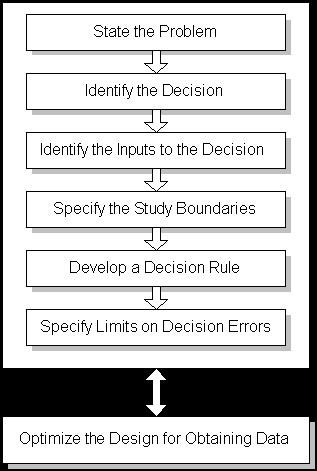
Figure 2. The DQO Process is a systematic planning approach to environmental data operations.
SimSITE also provides a link to another EPA software program called Decision Error Feasibility Trials (DEFT), which provides statistical calculations for determining how many samples are needed to satisfy the DQO performance criteria. The user can vary several parameters associated with the DQOs to determine the optimal number and type of samples to take. These calculations are repeated in each of the different sampling zones that the user has chosen.
The "Plan Samples" DialogOnce the number of samples has been determined, the user interacts with SimSITE’s Plan Samples dialog to lay out the locations of samples on the artificial site. Figure 3 shows the Plan Samples dialog box. First, the user decides whether a probabilistic or judgmental scheme will be used. The probabilistic schemes use randomization to locate the spatial coordinates for sample locations; the judgmental scheme uses a simple point-and-click routine to locate the samples wherever the user wants them. The user next decides whether the samples will be placed within ½-acre "exposure areas" (decision units) or user-defined areas (polygons specified using mouse clicks on the site map). The user can select different methods for collecting the physical sample in the field and for analyzing the sample to obtain a concentration value. Each method will have different costs and performance characteristics. If the user has chosen the judgmental approach, the remaining choices are grayed out (unavailable). Clicking the "Done" button will allow the user to point and click on the site map to indicate sampling locations. If the user has chosen a probabilistic approach, then a choice must be made between random versus gridded samples. Random sample locations are generated by SimSITE using a simple random sampling algorithm that allows each x and y coordinate within a sampling zone to have an equal probability of selection. Gridded sample locations are generated using the x and y grid node spacing specified by the user and generating random x and y coordinates to determine the starting point of the grid. SimSITE also allows the user to choose composite sampling, which involves taking multiple samples, physically mixing them in the field, and taking a subsample for analysis. The user can specify how many individual sampling locations will be used to form a single composite sample and how many times this process will be repeated within a sampling zone to obtain multiple composite sample analyses. After these design parameters are selected, the user clicks the "Done" button.

Figure 3. SimSITE's Plan Samples dialog allows the user to choose from many options for laying out the type and number of samples.
Each time the user clicks the "Done" button after specifying the sampling design parameters, SimSITE starts to plan a batch of samples by allowing the user to specify sample locations on the site map. As described above, the user can specify a batch of judgmental samples by pointing and clicking at each desired sample location, then clicking "Done" on a pop-up window. If the user chose a probabilistic sampling design for ½-acre sampling zones, the user selects one or more prespecified square cells; SimSITE will then implement the specified design within each of the selected ½-acre cells. If the user chose a probabilistic sampling design within a user-defined area, then SimSITE implements the design within that area. After generating the sample locations, SimSITE displays the sample locations with an "X" and color codes each batch.
THE "Take Samples" ROUTINESAfter planning each sample batch, the user specifies which batches to implement or "take." Figure 4 shows the Take Samples dialog box. The user can specify how many members to assign to a field sampling crew, which determines the amount of virtual time in the field taken for sampling. SimSITE calculates costs based on the number of samples, the analytical method used for making measurements, and crew size. Taking a sample involves several routines that locate each sample over the "true" contamination data layer, obtain a PCB concentration value, add some random error to simulate the real-world imperfections of the sampling and analysis processes, and then return an observation that is displayed on the site map using a color coding scheme based on concentration. The observed concentrations are also written to ArcView tables, which are then available for evaluation during the assessment phase of the site investigation.
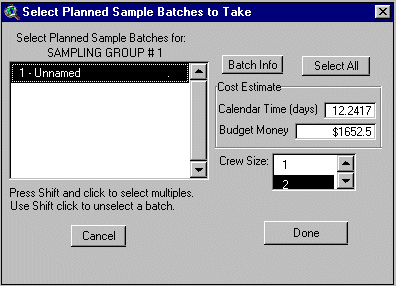
Figure 4. The Take Samples dialog allows the user to specify which batches of samples to take and shows the user how much time and money will be spent.
DATA QUALITY ASSESSMENTS
After the user has taken all of the samples desired, the resulting data can be analyzed using a variety of statistical tools. The general approach that is taught for analyzing the data is EPA’s Data Quality Assessment (DQA) process. DQA is a scientific and statistical evaluation of a data set to determine if the performance criteria (i.e., the DQOs) have been satisfied. It generally involves looking at graphical representations of the data, choosing appropriate statistical procedures, verifying the assumptions of the statistical procedures, and then applying the procedures and drawing conclusions from the data. The statistical methods become particularly important when evaluating data that show large amounts of variability, which is typical of environmental investigations. The statistical procedures addressed in DQA provide a sound scientific basis for drawing conclusions with sufficient confidence in the face of uncertainties about site conditions. SimSITE has many of these statistical capabilities built into the DQA menu options, using Avenue scripts and built-in ArcView data display functions. SimSITE also can export the data to a text file format that can be read by EPA’s DataQUEST software, which has additional graphical and statistical tools. Using these tools, the training participants can determine whether the contamination levels in each one of their sampling zones exceeds their threshold for taking action to clean up that area.
MAKING DECISIONSAfter the user has evaluated the data, SimSITE provides routines for making decisions about whether or not to clean up a particular area. Using the mouse, the user selects and marks the ½-acre decision units or user-defined areas that are believed to be contaminated above the action threshold. The user is not bound to be consistent with the results of any statistical analysis, which allows context and professional judgment to be weighed when making site management decisions. After the user has completed marking all of the areas to be cleaned up, the investigation is over. However, one of the most important and entertaining phases of the training course comes next.
EVALUATING SESSION PERFORMANCEThe great advantage of using SimSITE to simulate a site investigation comes at the end, when the "true" underlying contamination is revealed to the training participants. Although this can be done by directly displaying a color-codes map of contaminant concentrations, the more interesting mode of display shows the true contamination in relation to the user’s decisions. Using cross-hatching to indicate the user’s decisions about whether or not to clean up each ½-acre area, coupled with a precalculated color-coded display of the true average concentration within each ½-acre area, SimSITE shows the user where they made "decision errors" by cleaning up areas that were truly below the threshold or failing to clean up areas that were contaminated above the threshold. Figure 5 shows how this is displayed.
When the user has selected user-defined areas as the decision units, SimSITE has a slightly different way of displaying the underlying truth. In this case, SimSITE calculates the "true" spatial average concentration within the user-defined area, posts the true average value in the center of the area, and color-codes the cross-hatching as green if the user’s decision was correct or red if the user’s decision was incorrect. Figure 6 shows two correct decisions in user-defined areas.
In most training settings, most of the decisions will be correct. However, usually there will be at least one decision error within the class. This seems to provide a powerful learning experience for the participants, as they see how uncertainties in data can lead to bad outcomes, despite being careful in how they sampled the site and analyzed their data.
Please click on image to see full view...
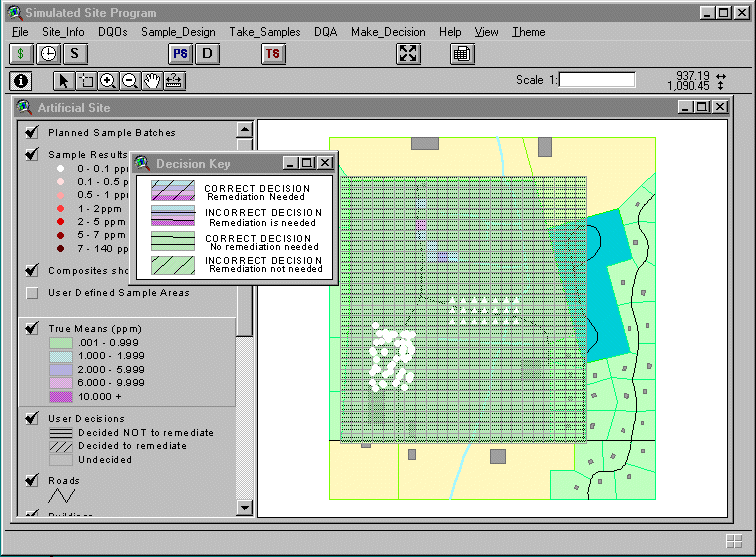
Figure 5. SimSITE shows where the user made incorrect decisions within 1/2-acre decision units
Please click on image to see full view...
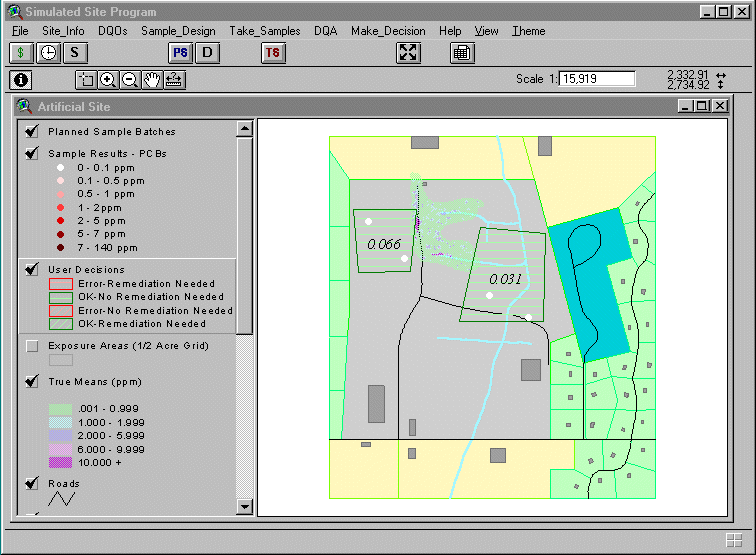
Figure 6. SimSITE calculates the true average concentration in each user-defined area and shows whether the user's decision was correct.
SUMMARY AND CONCLUSIONS
SimSITE provides an important tool for teaching statistical quality assurance concepts and methods. The GIS platform allows the training participants to interactively explore different sampling approaches, analyze simulated data, and then see how well the strategy worked in relation to an underlying "truth." The ability to see the planning, implementation, and assessment phases of an environmental investigation as an integrated whole appears to accelerate the transfer of knowledge about the quality system framework.
SimSITE demonstrates the potential for extending this type of computer-based simulation tool. Additional contamination scenarios are planned, including a radioactive soil investigation, and ground water contamination. Clearly, more information about environmental conditions and context can be conveyed through multimedia techniques, such as photographs, video clips, and even 3-dimensional rendering in a virtual reality environment. Although SimSITE was designed as a training support tool, the underlying organization of information and data could be applied to a more general problem-solving application for investigating real environmental problems. Many additional features would be required, such as more convenient site map input capabilities, additional sampling design tools, and interfaces with field sampling data management systems. Additional simulation tools, such as the ability to lay down a variety of different contamination patterns consistent with known conditions, would serve both problem-solving and research functions. Readers interested in collaborating on such projects should contact the authors.
ACKNOWLEDGEMENTS
SimSITE was developed by Research Triangle Institute, with technical support from Battelle Memorial Institute, under Contract 68-D4-0091, sponsored by the Office of Research and Development, Quality Assurance Division, United States Environmental Protection Agency.
Authors:
Malcolm J. Bertoni
Senior Research Environmental Scientist
Manager, Environmental Quality Systems Department
Research Triangle Institute
1615 M Street, NW, Suite 740
Washington, DC 20036
Phone: 202-728-2067
Fax: 202-728-2095
e-mail: mjb@rti.org
Research Triangle Institute
Center for Environmental Measurements and Quality Assurance
PO Box 12194
Research Triangle Park, NC 27709-2194
Phone: 919-541-6000